Domain verification
Domain verification is the ownership floor for every signed surface Sill publishes on a site’s behalf. Sill mints a per-site, 256-bit opaque proof token at site creation, and accepts a site as proven only after Sill’s own origin server fetches that token directly from the registered domain — either out of the install snippet rendered in the homepage, or from a .well-known/sill-proof.txt file you publish. Until the proof is recorded, the site stays in pending_proof and Sill will not sign an agent card, run an MCP endpoint, or publish an ARD catalog for it.
Why a fetch, not a DNS record
Section titled “Why a fetch, not a DNS record”Sill previously used a DNS CNAME (_sill-verify.<domain> → a shared Sill target) for ownership verification. That scheme was retired: the target was the same for every merchant, so anyone who knew the pattern could add the same CNAME to a domain they did not own. The current HTTP-challenge proof binds to a per-site token that lives only in Sill’s origin storage and in your served HTML, and the verifying fetch is done by Sill’s own server against the registered domain, so a mirror, proxy, or scraper page cannot satisfy it. The retired DNS endpoint still exists for backward compatibility, but it now returns 410 Gone with a pointer to the new endpoint.
The proof token
Section titled “The proof token”When you create a site, Sill mints a proof_token shaped like:
pf_<43-char base64url>- 256 bits of entropy, base64url-encoded with no padding, prefixed
pf_for readability. - Bound to the site for its lifetime. Rotation is supported as a sensitive action and is the recommended response to a suspected leak.
- Public by design once installed. The token appears in your served HTML or
.well-knownfile; that is fine. Possession of the token alone does not satisfy the proof — the proof requires that the token be served from the registered domain itself, and Sill’s origin (not the client) does the fetch. - Not the same as your
site_key. The two are independently random. An attacker who knows yoursite_keyknows nothing about yourproof_token, and vice versa.
The two paths to a proven site
Section titled “The two paths to a proven site”You can satisfy the proof in either of two structurally identical ways. Both write the same kind of record (proof_method: "http_challenge"); pick whichever fits your stack.
Path A — snippet in the homepage (default)
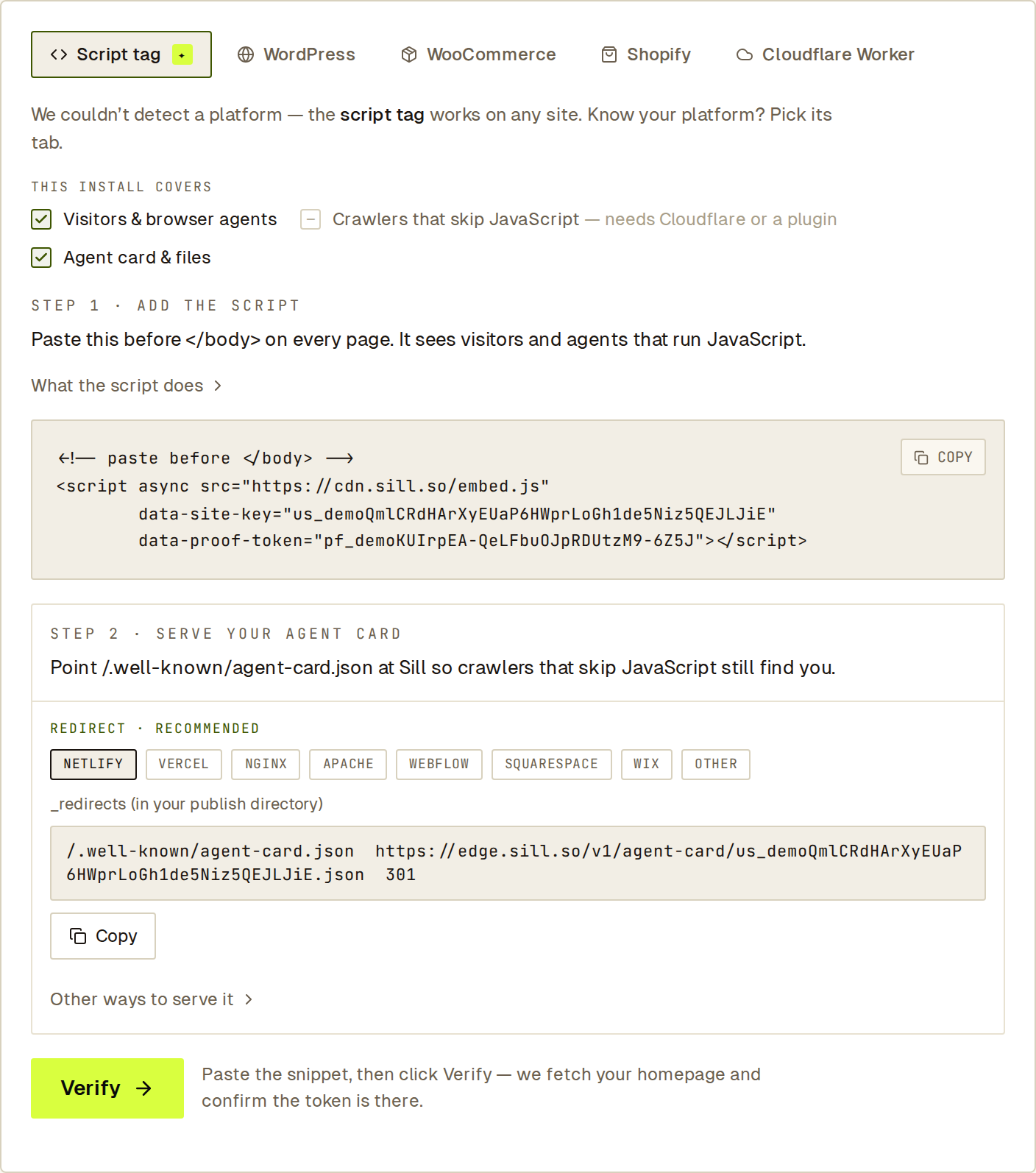
Section titled “Path A — snippet in the homepage (default)”The Sill install snippet you would paste anyway to install Discovery carries the proof token alongside the site key:
<!-- paste before </body> --><script async src="https://cdn.sill.so/embed.js" data-site-key="sk_…" data-proof-token="pf_…"></script>When you click Verify in the dashboard, Sill’s origin fetches https://<your-domain>/ and looks for a <script> tag whose src resolves to cdn.sill.so/embed.js and whose data-proof-token attribute matches the value stored against your site. The proof token is per-site and opaque, and the embed runtime in the browser never reads or sends it. The attribute exists purely so Sill’s origin can server-fetch your published HTML and confirm the snippet is present — an anti-spoofing ownership proof that binds the proof to the served domain.
This is the default because most managed and static stacks (WordPress, Shopify themes, Webflow, Squarespace, Hugo, 11ty, Astro, Cloudflare Pages) serve the homepage HTML server-side with the <script> tag inline in the response.
Path B — .well-known/sill-proof.txt fallback
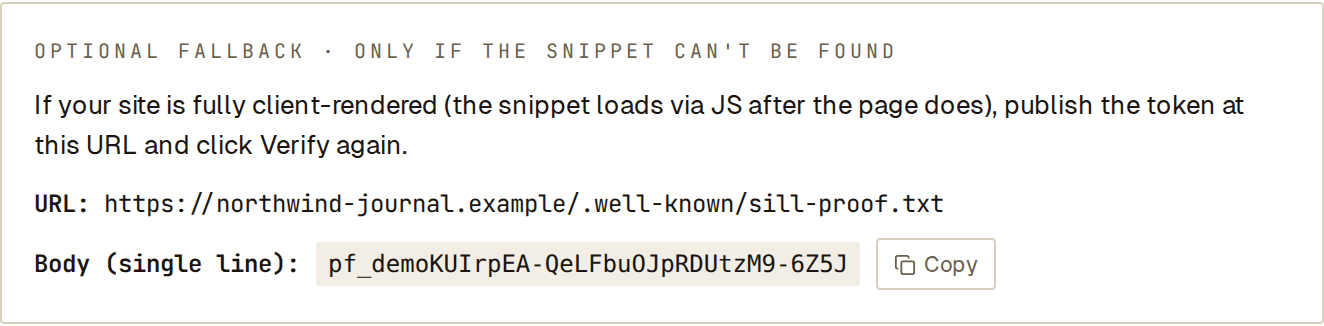
Section titled “Path B — .well-known/sill-proof.txt fallback”If your homepage is fully client-rendered (a CSR React/Vue/Svelte SPA where the <script> tag is injected by JavaScript and is absent from the raw server response), publish the token at:
https://<your-domain>/.well-known/sill-proof.txtThe file body is exactly the token, on a single line, with no surrounding whitespace or markup:
pf_AbCdEfGhIjKlMnOpQrStUvWxYz0123456789-_AbCdEfGEvery major static and managed host (WordPress, Shopify, Webflow, Squarespace, Netlify, Vercel, Cloudflare Pages, GitHub Pages) serves .well-known paths without configuration.
The dashboard surfaces this affordance automatically if the snippet path misses. You can also choose it from the start.
The verification flow
Section titled “The verification flow”sequenceDiagram
autonumber
participant M as Merchant (dashboard)
participant API as Sill origin
participant Site as Your domain
M->>API: POST /v1/sites/:site_id/proof-check
API->>Site: GET https://<domain>/ (safe-fetch, DNS+IP pinned)
alt snippet matches
Site-->>API: HTML with matching data-proof-token
API->>API: record http_challenge proof; flip status to discovery_active
API-->>M: 200 { ok: true, proof_path: "snippet_in_homepage" }
else snippet missing
API->>Site: GET https://<domain>/.well-known/sill-proof.txt
alt fallback matches
Site-->>API: pf_…
API->>API: record http_challenge proof; flip status to discovery_active
API-->>M: 200 { ok: true, proof_path: "well_known" }
else fallback also misses
API-->>M: 200 { ok: false, reason: "homepage_miss_and_well_known_mismatch" }
end
end
The outbound fetch uses Sill’s SSRF-hardened fetcher: it resolves the registered domain’s DNS, pins the resolved IP for the connection, refuses private and link-local address ranges, caps the response body, and enforces a short timeout. This is the property that makes the proof unforgeable from outside the registered domain.
What to expect in the dashboard
Section titled “What to expect in the dashboard”The “Install and verify” step in onboarding. The snippet is pre-filled with your site key and your proof token. “Verify” triggers proof-check against your domain. When the homepage fetch misses, the panel exposes the .well-known fallback inline.
There is no separate “Skip verify” affordance. The proof check itself advances the onboarding flow; you cannot move past Install and verify without a recorded proof.
If your site is on Shopify and you connect via OAuth, the OAuth callback can also record an ownership proof — see OAuth as proof below.
The endpoints, end to end
Section titled “The endpoints, end to end”All three endpoints are authenticated dashboard endpoints scoped to your account by row-level security. The CORS preflight and rate-limit posture are listed alongside each.
GET /v1/sites/:site_id/proof-token
Section titled “GET /v1/sites/:site_id/proof-token”Returns the proof token, a pre-rendered install snippet, and the .well-known fallback details for your site. Rate limit: 30 requests / minute per account.
GET /v1/sites/01J.../proof-token HTTP/1.1Host: api.sill.soCookie: <dashboard session>{ "proof_token": "pf_AbCdEfGhIjKlMnOpQrStUvWxYz0123456789-_AbCdEfG", "install_snippet": "<script src=\"https://cdn.sill.so/embed.js\" data-site-key=\"<your_site_key>\" data-proof-token=\"pf_AbCd…\" defer></script>", "fallback": { "well_known_url": "https://example.com/.well-known/sill-proof.txt", "well_known_body": "pf_AbCdEfGhIjKlMnOpQrStUvWxYz0123456789-_AbCdEfG" }, "proof_status": "pending", "recorded_at": null}proof_status is one of:
pending— no proof recorded yet.recorded— proof recorded; site isdiscovery_active.rotated_pending— the token has been rotated; the previous proof is still on file but a freshproof-checkis required against the new token.
POST /v1/sites/:site_id/proof-check
Section titled “POST /v1/sites/:site_id/proof-check”Triggers the origin fetch. Rate limit: 10 requests / minute per site.
POST /v1/sites/01J.../proof-check HTTP/1.1Host: api.sill.soCookie: <dashboard session>Content-Type: application/json
{}You may optionally pin the install page to a path other than / (for sites whose homepage does not carry the snippet but, say, /about does):
{ "install_page_path": "/about" }The path must be a same-origin relative path on the registered domain.
On a successful proof:
{ "ok": true, "proof_path": "snippet_in_homepage", "recorded_at": "2026-06-22T17:04:11.812Z"}proof_path is snippet_in_homepage when the homepage snippet matched, and well_known when the .well-known fallback matched.
On a failure, the dashboard surfaces the specific reason inline. The proof-check endpoint returns { ok: false, reason } (rather than an HTTP error code) for snippet-missing cases, so the dashboard can render the reason in line:
reason | Meaning |
|---|---|
fetch_failed | The homepage could not be fetched (DNS, TLS, timeout, blocked IP range). |
homepage_miss_and_well_known_unreachable | Snippet not present in homepage HTML; the .well-known fallback URL also could not be fetched. |
homepage_miss_and_well_known_mismatch | Snippet not present in homepage HTML; the .well-known file was served but did not match the token. |
rate_limited | More than 10 checks in the last minute against this site. Retry after retry_after_seconds. Returned as HTTP 429 with a Retry-After header. |
site_suspended | The site is suspended; verification is not allowed. Returned as HTTP 403. |
POST /v1/sites/:site_id/proof-token/rotate
Section titled “POST /v1/sites/:site_id/proof-token/rotate”Mints a fresh proof_token for the site. Two modes are supported:
immediate_revoke— the previous token is revoked immediately. Use this if you suspect the snippet was scraped or the file was leaked.graceful— both the old and the new token are accepted for 24 hours, so you can re-deploy without breaking the proof state. Routine rotations should use this mode.
The request body also requires a reason of routine, suspected_leak, or lost_access:
{ "mode": "graceful", "reason": "routine" }Rate limit: 5 requests / hour per account. After rotation, your snippet must be updated and proof-check must be re-run; in the interim, proof_status reports rotated_pending.
What a verified site unlocks
Section titled “What a verified site unlocks”A recorded HTTP-challenge proof transitions the site to discovery_active and unlocks the per-site signed surfaces. Independently verifiable against the public JWKS:
- A2A-compatible agent card at
https://edge.sill.so/v1/agent-card/{site_key}.json. - Streamable-HTTP MCP server at
POST https://edge.sill.so/v1/mcp/{site_key}. - Signed ARD
ai-catalog.jsonathttps://edge.sill.so/v1/catalog/{site_key}.json.
See Verify a signature for the third-party verification recipe (RFC 8785 JCS + RFC 8037 / RFC 7515 JWS EdDSA).
The Transactional surfaces (signed mandate execution, payment authorization) are gated on stricter tiers — see the Transactional overview for the honest scope of what is live today.
OAuth as proof
Section titled “OAuth as proof”A successful Shopify or Stripe OAuth connect can also record an ownership proof, on one condition: the published backend domain must match the registered Sill domain. For Shopify that means the Sill site.domain matches either the shop value ({handle}.myshopify.com) or one of the storefront / primary custom domains. For Stripe it means site.domain matches the business_profile.url host. Divergence is surfaced as an explicit reconciliation in the dashboard; it does not silently grant the site a proven state.
This path is convenient for Shopify Plus and pure-SaaS storefronts that cannot edit a theme or serve a custom .well-known file. Outside of those, the HTTP-challenge proof is the recommended primary path.
Operational guidance
Section titled “Operational guidance”- Keep the snippet in your published HTML. Removing it does not auto-revoke an existing proof, but it removes the evidence Sill could re-fetch if you re-verify later.
- Rotate on leak suspicion, not on schedule. The token is opaque and bound to the site; there is no value in routine rotation.
- Treat the proof token as low-sensitivity but real. It is public-by-design; the risk is not exposure, it is whether the token an attacker sees is the current token. Rotate immediately if you have any reason to doubt it.
Frequently asked
Section titled “Frequently asked”Does Sill need access to my DNS?
No. The current scheme is an HTTP fetch; you do not add any DNS record. The retired CNAME-based scheme has been removed.
Can I install the embed without verifying first?
You install the embed in order to verify — the snippet carries the proof token, and the verification step is what records the proof. Sites that have not been verified stay in pending_proof and Sill will not sign anything for them.
My homepage is a SPA — what do I do?
Use the .well-known/sill-proof.txt fallback. Most static hosts serve .well-known paths without configuration. If you cannot serve a custom file (Shopify Plus, certain SaaS storefronts), the Shopify OAuth path or Stripe Connect can record the proof instead, subject to the domain-match check.
Can the same proof token be reused across multiple sites?
No. Each site has its own randomly generated token. Reusing a token would not satisfy another site’s proof-check anyway, because the lookup is keyed on site_id.
Is the proof token sensitive? It is public-by-design once installed. The proof property is “Sill’s origin fetched this token from the registered domain”, not “the holder of this token is authorized”. Treat it as low-sensitivity but rotate on leak suspicion.
What happens if I rotate my token?
The site enters rotated_pending. In graceful mode, both tokens are accepted for 24 hours so you can roll out the new snippet without downtime. In immediate_revoke mode, only the new token is accepted from that moment on. Either way, you must update the snippet (or .well-known file) and re-run proof-check to clear the rotated_pending state.
Where does the verification fetch come from?
Sill’s origin (api.sill.so, US-East). Outbound fetches use Sill’s SSRF-hardened fetcher with DNS + IP pinning. There is no public list of source IPs; the property the verifier relies on is reaching the real DNS-resolved host of your registered domain.