Refunds
An agent asks for a refund with a second signed mandate that points at the original order. The request goes through your guardrails like any order, can be held for review, and is refunded on the rail that took the original payment: Stripe, or Shopify in test mode. Sill never holds the money: Stripe returns it to the buyer. Every step is written to the signed audit log.
How a refund flows
Section titled “How a refund flows”sequenceDiagram
autonumber
participant Agent
participant Sill
participant Team as Owner or Admin
participant Rail as Stripe (or Shopify test mode)
Agent->>Sill: Signed refund request for an earlier order
Sill->>Sill: Verify signature, run your guardrails
opt A rule holds it for review
Sill-->>Agent: escalated
Team->>Sill: Approve on Held orders
end
Sill->>Sill: Find the original order and its rail
Sill->>Rail: Refund the original payment
Rail-->>Sill: Succeeded or failed
Sill->>Sill: Signed record of the refund
The agent never names the refund amount. Sill refunds the original charged total, or less if the agent’s signed cap is lower.
The refund request
Section titled “The refund request”A refund mandate has intent.action set to request_refund and only these intent fields:
{ "signed": { "mandate_id": "mnd_01K6HBK7MK753DH3YBX4NVCYTT", "site_id": "01JDEMOSITE00000000000MAIN", "agent_id": "agent_acme_shopper", "issued_at": "2026-09-30T15:38:00.000Z", "expires_at": "2026-09-30T15:38:30.000Z", "nonce": "Q8sLm2Vx7Tb4Nc1Rp9Kd3w", "replay_window_seconds": 30, "principal": { "type": "human", "verification": "delegated" }, "intent": { "action": "request_refund", "merchant": "northwind-coffee.example", "original_mandate_id": "mnd_01K6HXAVBQ8G8PYZKN9JXJEPTN", "reason_code": "wrong_item", "scope": "full", "max_amount": 89.00, "currency": "USD" }, "protocol_context": { "protocol": "a2a", "version": "1.2" } }, "envelope": { "algorithm": "ed25519", "key_id": "acme-2026-10", "signature": "<86-character base64url ed25519 signature>" }}| Field | Meaning |
|---|---|
original_mandate_id | The order being refunded. It must be an order on the same site that was approved and charged. |
reason_code | One of requested_by_customer, defective, not_received, wrong_item, other. |
scope | "full". A list of line items is accepted in the request but not refunded today; see Current limits. |
max_amount | The most the agent may refund, in major units. It caps the refund; it does not set it. |
Order fields such as sku, line_items, quoted_total or buyer are refused on a refund: the order details come from Sill’s own record of the original.
Review refund requests
Section titled “Review refund requests”Whether a refund is held depends on your policy. The baseline policy (v1-default) never holds refunds. To review them, add Human review (HITL) on destructive actions (r07) with action Escalate under Rules, or load the Conservative / manual review template, which holds refunds over $50.
A held refund appears on Held orders with a headline such as Refund request · Wrong item · up to $89.00, and with the original order Sill found in its own records: the items, the settled total, a link to the charge in Stripe and the buyer’s details. Owners and Admins approve or reject; Reviewers can look but not decide. If you reject, or nobody decides within 24 hours, nothing is refunded.
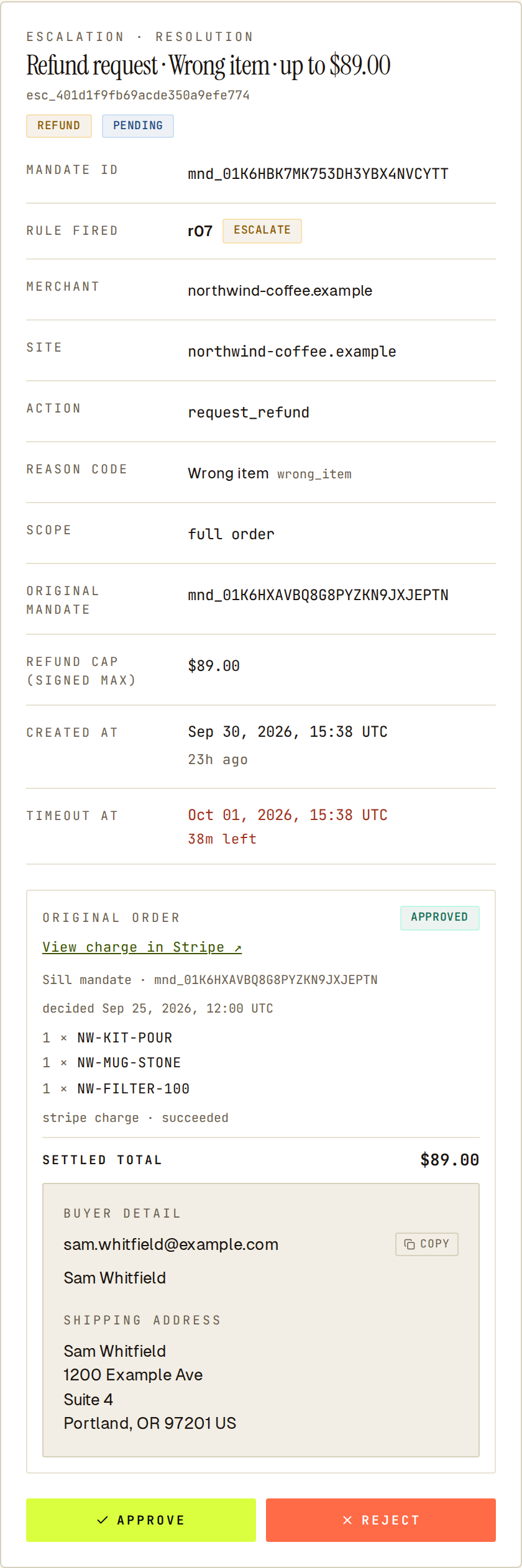 Check the original order Sill found before approving the refund.
Auto-approving small refunds
Section titled “Auto-approving small refunds”Under Rules → AUTO-REFUND (Approve refunds under a cap automatically), Owners and Admins can skip review for small refunds:
- Turn on Auto-approve refunds under cap.
- Set MAXIMUM AUTO-APPROVE AMOUNT and save.
A refund is then approved without review only if it is at or under the cap and comes from the same agent that placed the original order. Larger refunds, and refunds from any other agent, are still held. The signed record of an auto-approved refund has no reviewer on it.
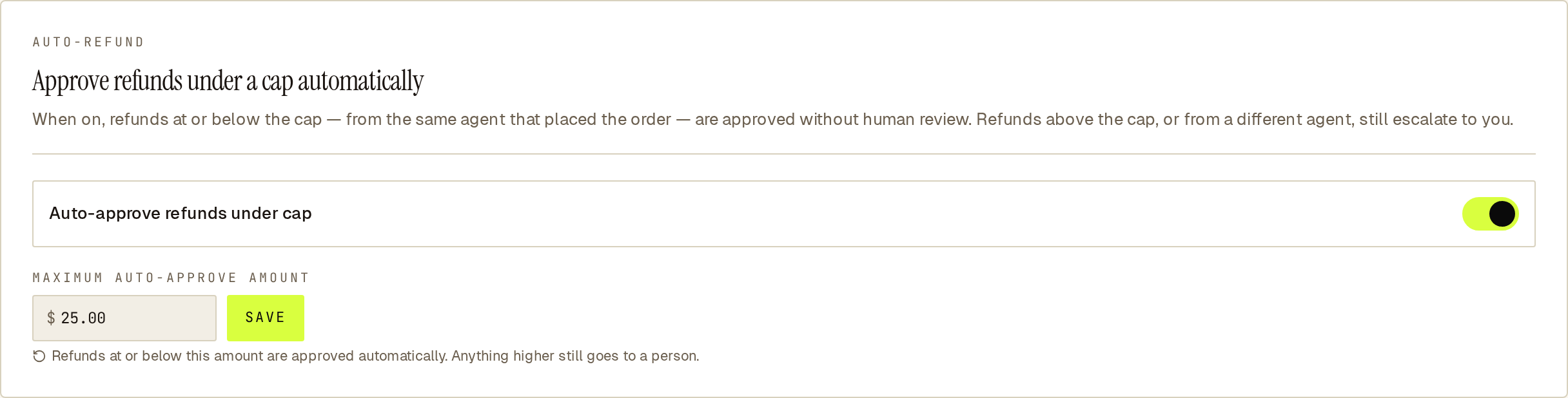 Auto-refund approves small refunds from the agent that placed the order; everything else still waits for you.
Where the money goes back
Section titled “Where the money goes back”| Original paid on | Refund runs on | Status |
|---|---|---|
| Stripe | Stripe refund on your connected account | Available in test and live mode |
| Shopify | Shopify refund on the store | Test mode only |
WooCommerce stores. Orders on a WooCommerce site are paid on Stripe, so their refunds run on Stripe too. After Stripe confirms, Sill records the refund on the matching WooCommerce order, without asking any WooCommerce gateway to move money. This needs Read/Write REST API keys; with read-only keys the Stripe refund still happens but the WooCommerce order is not updated. A WooCommerce site without Stripe connected cannot take agent refunds.
When a refund does not go through
Section titled “When a refund does not go through”Nothing is sent to the rail in these cases, and the refund’s record says why:
| Reason | Meaning |
|---|---|
| Original not charged | The original order is not on this site, was not approved, or was never charged. |
| Already executed | The original order already has a refund. Only one refund per order is possible. |
| Scope unsupported | The request asked for specific line items. Send "scope": "full". |
| Rail disabled | The rail that took the original payment is not enabled for the site. |
| Rate limited by self | Too many refunds in a short time for this account. Sill retries automatically. |
Sending the same refund mandate twice never refunds twice.
Refunds and disputes made outside Sill
Section titled “Refunds and disputes made outside Sill”Sill also records what Stripe reports about orders it charged. A refund you issue in the Stripe dashboard is added to the original order with the refunded amount, and a dispute is added with its reason and amount. Responding to a dispute happens in your Stripe dashboard; Sill does not submit evidence for you.
What the audit log records
Section titled “What the audit log records”Each refund request ends in one signed decision record (approved, escalated_approved, escalated_rejected or rejected). When the refund succeeds, a separate signed settlement record is added that links the refunded amount to that decision, the same way charges are recorded. Open the refund under Activity to see the original order and the amount refunded. See Audit envelope.
Current limits
Section titled “Current limits”- Refunds run on Stripe in test and live mode, and on Shopify in test mode only.
- Only full refunds: requests for specific line items are refused.
- One refund per order; a second refund request for the same order is refused. A refund is less than the original total only when the agent’s signed
max_amountis lower. - Refunds never involve card numbers; Sill only works with Stripe’s charge and payment ids.
Common questions
Section titled “Common questions”Can an agent refund any amount it wants?
Section titled “Can an agent refund any amount it wants?”No. The refund is the original charged total, or the agent’s signed max_amount if that is lower. The agent cannot state what the original order cost.
Can refunds skip review?
Section titled “Can refunds skip review?”Yes. The baseline policy does not hold refunds at all. If you add a review rule, Auto-refund can still approve small refunds from the agent that placed the order.
What if the original order was never charged?
Section titled “What if the original order was never charged?”The refund is refused with “Original not charged”, and nothing is sent to Stripe.