Human in the loop
Human in the loop is what happens when one of your rules is set to escalate. Instead of approving or rejecting the order, Sill holds it: the agent is told the order is held, the order appears on Held orders, and your team gets an alert. Nothing is charged and nothing is sent to your store until an Owner or Admin approves. A rejected order, or one nobody resolves within 24 hours, is never charged.
For a walkthrough of the Held orders screen itself, see Held orders.
The flow
Section titled “The flow”sequenceDiagram
autonumber
participant Agent
participant Sill
participant Team as Owner or Admin
participant Stripe as Stripe (your account)
Agent->>Sill: Signed order
Sill->>Sill: A guardrail escalates
Sill-->>Agent: 202 escalated, with escalation_id
Sill->>Team: Email and Slack alert
Note over Sill,Stripe: Held. Nothing charged.
alt Approve
Team->>Sill: Approve on Held orders
Sill->>Stripe: Charge
Sill->>Sill: Signed record: escalated_approved
else Reject
Team->>Sill: Reject on Held orders
Sill->>Sill: Signed record: escalated_rejected
else Nobody decides within 24 hours
Sill->>Sill: Signed record: escalated_rejected
end
Which orders get held
Section titled “Which orders get held”An order is held when a rule whose action is Escalate fails. Common choices:
- Max per transaction (
r05) set to escalate, so orders above a cap wait for a person instead of being refused. - Human review (HITL) on destructive actions (
r07), which holds refunds and subscription cancellations above an auto-approve amount.
The baseline policy Sill installs when you connect a payment rail (v1-default) never escalates; every rule in it rejects. Escalation starts when you add an escalate rule under Rules or load the Conservative / manual review starter template, which holds refunds and cancellations over $50.
What the agent receives
Section titled “What the agent receives”The agent gets HTTP 202 straight away:
HTTP/2 202content-type: application/json
{  "outcome": "escalated",  "mandate_id": "mnd_01K6HB8Q4ZJ7WX2R6MN3TPKD0F",  "escalation_id": "esc_9c4e1a7f30b2d58e6a1c4f7b92",  "evaluated_at": "2026-10-01T15:00:00.000Z",  "evaluated_rule_id": "r05"}
Sill does not send the final decision back to the agent. If the order is approved it is charged on your rail; either way the decision is in your audit log.
Review a held order
Section titled “Review a held order”Open Held orders. Each held order shows the action, the items, the signed maximum, the quoted total, the rule that held it and the time left before it is rejected automatically. Buyer details (email, name, shipping address) are only shown when you open the order, and each view is logged.
| Role | See held orders and buyer details | Approve or reject |
|---|---|---|
| Owner, Admin | Yes | Yes |
| Reviewer | Yes | No |
| Viewer | No | No |
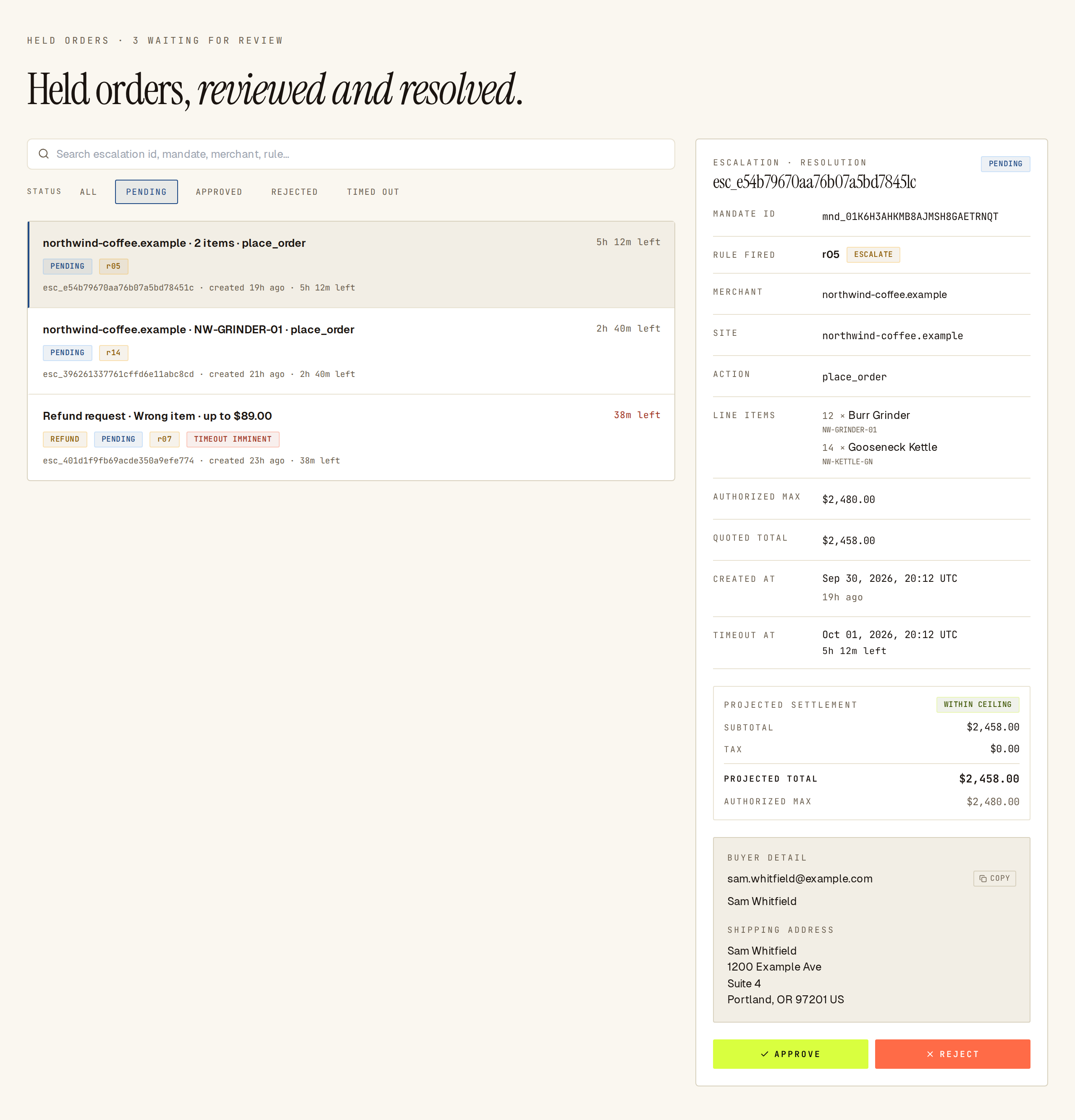 Pending held orders with their time left; the selected order shows the rule, amounts and approve or reject.
- Approve asks Approve escalation? — This approves the transaction and settles the payment. Confirming charges the order on your rail.
- Reject asks Reject escalation? — This denies the transaction and cancels the order. Nothing is charged.
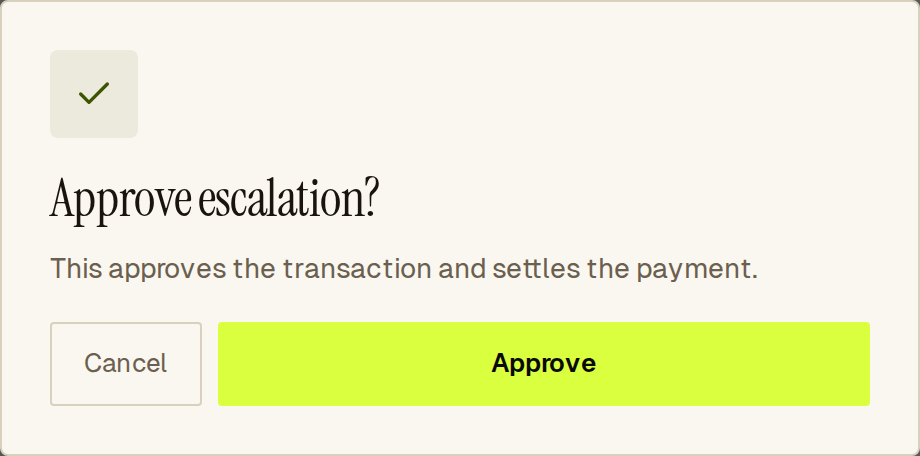 Approving a held order charges it; check the Stripe mode first.
If nobody decides
Section titled “If nobody decides”A held order expires 24 hours after it was held. Sill then rejects it and writes an escalated_rejected record with no reviewer on it. An expired order is never charged.
What the audit log records
Section titled “What the audit log records”Each held order ends in exactly one signed record:
escalated_approved— approved by a person, then charged like any approved order. A separate signed settlement record follows once the charge succeeds.escalated_rejected— rejected by a person or expired.
When a person decided, the record carries their user id (an opaque id, not a name or email) and the time of the decision, so you can show who approved an order without the record holding personal data. Resolved orders appear in the audit log and bundle export.
Held orders API
Section titled “Held orders API”The dashboard uses these endpoints on https://api.sill.so with your signed-in session.
List held orders
Section titled “List held orders”GET /v1/escalations returns up to 100 items. Optional query parameters: status (pending, approved, rejected, timed_out; omit for all) and site_id. Owners, Admins and Reviewers can call it.
{ "items": [ { "escalation_id": "esc_9c4e1a7f30b2d58e6a1c4f7b92", "mandate_id": "mnd_01K6HB8Q4ZJ7WX2R6MN3TPKD0F", "rule_id": "r05", "site_id": "01JDEMOSITE00000000000MAIN", "status": "pending", "created_at": "2026-10-01T15:00:00.000Z", "timeout_at": "2026-10-02T15:00:00.000Z", "summary": { "action": "place_order", "merchant": "northwind-coffee.example", "line_items": [ { "sku": "NW-GRINDER-01", "quantity": 12 }, { "sku": "NW-KETTLE-GN", "quantity": 14 } ], "max_amount": 2480, "quoted_total": 2458, "currency": "USD", "failed_rule_id": "r05" } } ]}The summary never contains buyer details. For refund requests the summary also carries original_mandate_id, reason_code and scope (full or partial), and the item carries the original order as original_order; see Refunds.
Approve or reject
Section titled “Approve or reject”POST /v1/escalations/{escalation_id}/resolve with {"decision":"approve"} or {"decision":"reject"}. Owners and Admins only.
{ "escalation_id": "esc_9c4e1a7f30b2d58e6a1c4f7b92", "status": "approved", "decision": "escalated_approved"}| Response | Meaning |
|---|---|
200 | Resolved. Sending the same decision again returns 200 and never charges twice. |
400 bad_request | The id is not an escalation id, or decision is not approve or reject. |
403 forbidden | Your role cannot resolve held orders. |
404 not_found | No such held order on a site you can access. |
409 conflict | Someone already resolved it the other way. Reload the queue. |
422 refund_scope_unsupported | The refund asks for specific line items rather than the full order and cannot be approved. |
503 settlement_enqueue_failed | The decision is saved but was not handed to the payment step. Send the same decision again; it will not charge twice. |
Common questions
Section titled “Common questions”Can a held order cost money before anyone approves? No. Nothing is sent to your payment provider until an Owner or Admin approves. Rejected and expired orders are never charged.
Can a held order be approved automatically? Only small refunds, and only if you turn on Auto-refund under Rules: refunds at or under your cap from the same agent that placed the order are approved without review. See Refunds. Expiry always rejects.
Is the original signature checked again on approval? No. The order was verified before it was held, and the held copy is what gets charged. The original signed request and the reviewer’s decision are both in the audit log.
See also
Section titled “See also”- Held orders — the Held orders screen.
- Escalation alerts — email and Slack.
- Policy engine — how rules escalate.
- Rules — where you set rule actions.
- Payments — what happens after approval.
- Refunds — refund requests on Held orders.
- Audit envelope — what the signed record contains.