Quickstart
This quickstart sets up Discovery, Sill’s observation mode. When you finish, Sill identifies the AI agents that visit your site, records each visit as a signed audit record, and publishes a signed agent card, an MCP server and a signed ai-catalog.json that agents can read.
Discovery never charges a card or changes an order. For agent checkout, see the Transactional overview.
Before you start
Section titled “Before you start”You need:
- A public website on a domain you control.
- A way to add Sill to it: paste a script tag, upload the WordPress plugin, connect Shopify, or (if your domain runs through Cloudflare) paste a Cloudflare API token. You never need to change DNS.
- An email address for the sign-in link.
1. Sign in
Section titled “1. Sign in”- Go to app.sill.so and enter your email.
- Click the link in the email. Sill has no passwords.
If you are new, Sill asks you to confirm before it creates your account.
2. Add your site and pick skills
Section titled “2. Add your site and pick skills”Onboarding has four steps: Domain, Skills, Install and verify, Complete. If you typed your domain on sill.so before signing in, Sill skips the Domain step.
- Enter your domain, for example
northwind-coffee.example. - On Skills (Pick what agents can do on {your domain}.), review the skills Sill turned on. A skill is something agents can do on your store, such as browse the catalog or check an order. Sill reads your site and turns on the skills that fit; checkout skills stay off until you connect a payment path. On a site that is not a store, Sill instead lists the pricing, demo, contact and similar pages it found on your homepage as business skills; turn on the ones you want.
- Click Continue to install.
3. Install Sill
Section titled “3. Install Sill”The install step has five tabs: Script tag, WordPress, WooCommerce, Shopify and Cloudflare Worker. Sill reads your site, pre-selects the tab it recommends and says what it found, for example “We think this is WooCommerce — not right? Pick any tab.” Any tab works; the script tag works on every site.
-
Follow the steps on the selected tab.
-
On the Script tag tab, paste this before
</body>on every page. The dashboard fills in your own values:<!-- paste before </body> --><script async src="https://cdn.sill.so/embed.js"data-site-key="us_…"data-proof-token="pf_…"></script>
Each tab lists what it covers under This install covers: Visitors & browser agents, Crawlers that skip JavaScript, Agent card & files and, for stores, Your store. Most AI crawlers do not run JavaScript, so only the Cloudflare Worker and the WordPress plugin see them. The script tag covers the agent card once you add the one-line redirect it shows in its Step 2. See What each install covers.
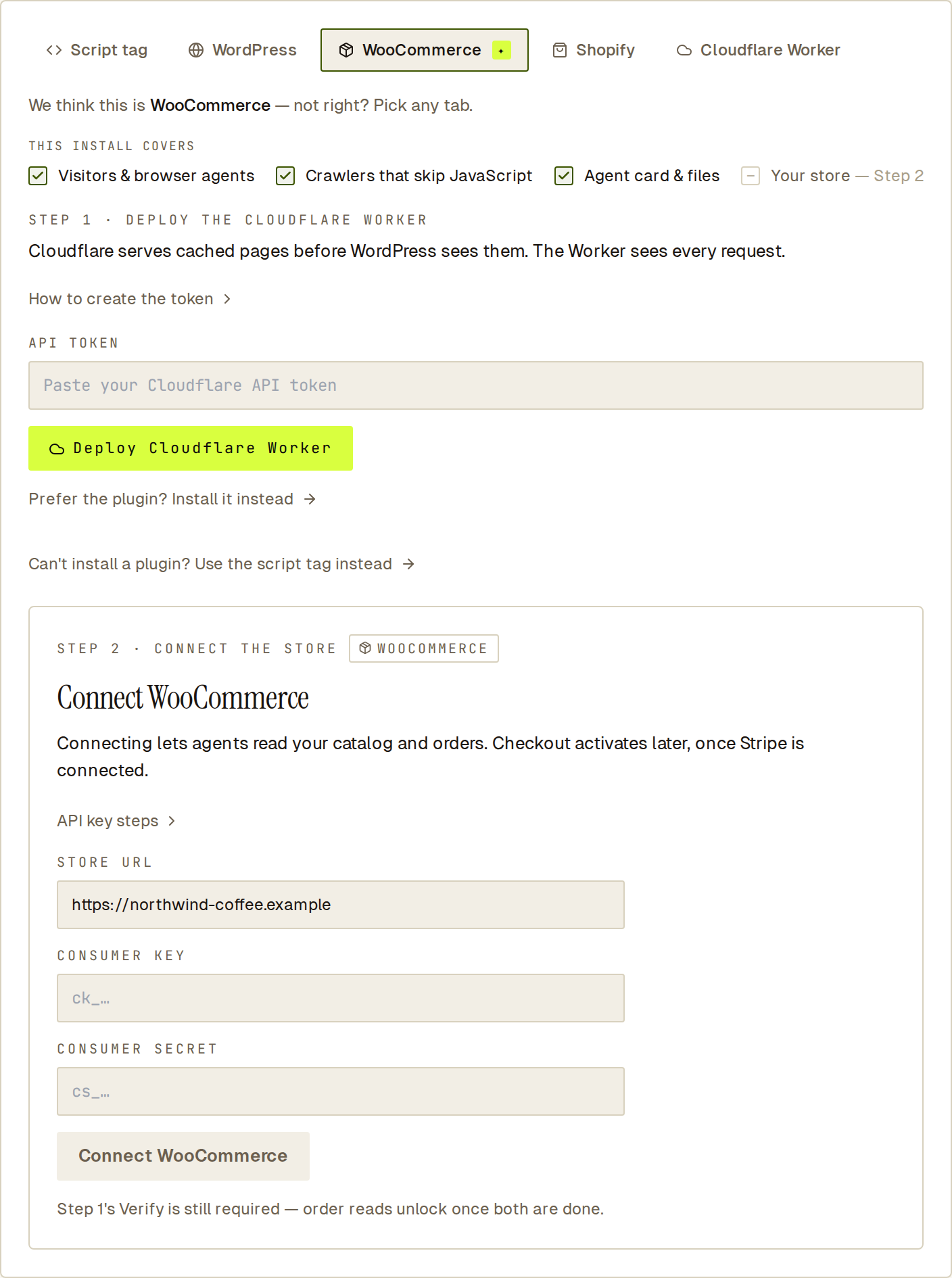 Sill pre-selects the install it recommends and lists what that install covers.
Not the person who edits your site? Open Invite your developer at the bottom of the step. Your developer gets admin access and an email that links to this step.
4. Verify that you own the domain
Section titled “4. Verify that you own the domain”Click Verify. Sill fetches your homepage and looks for your snippet. There is nothing to change in DNS.
- If your homepage is built by JavaScript and the snippet is not in the page source, publish the proof file Sill offers at
/.well-known/sill-proof.txtinstead. - The WordPress plugin and the Cloudflare Worker serve that file for you, and connecting Shopify proves ownership on its own.
Sill publishes your agent card, MCP server and ARD catalog only after the domain is verified. See Domain verification if verification fails.
5. See your first signed records
Section titled “5. See your first signed records”Open Activity in the top navigation. When an AI agent visits your site, a signed record appears for the visit, and the agent gets a row in the list. See Visits panel for how to read it. You can export any record as a signed audit bundle; see Audit log and bundle export.
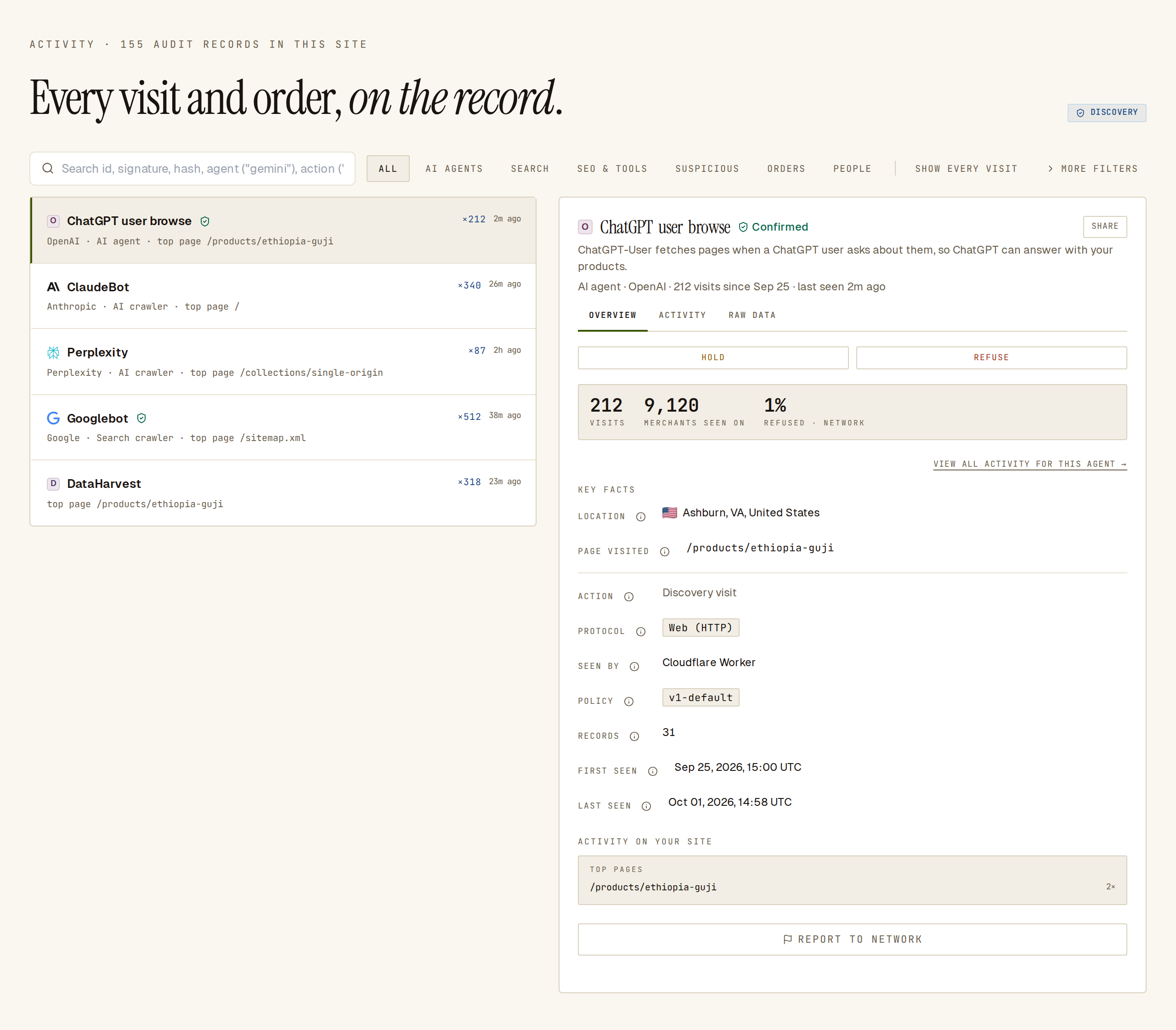 Each agent gets one row; every visit behind it is a signed record.
What you get next
Section titled “What you get next”Once your site is verified, agents can read three endpoints for it (the agent card and ARD catalog are signed):
- Agent card at
https://edge.sill.so/v1/agent-card/{site_key}.json— see Agent card. - MCP server at
POST https://edge.sill.so/v1/mcp/{site_key}— see MCP server. - ARD catalog at
https://edge.sill.so/v1/catalog/{site_key}.json— see ARD catalog.
Then open Agent readiness to see what agents can find, read and do on your store, and what to fix next.