Rules
Rules are what Sill checks on every signed agent order (a mandate) before any payment is attempted. Each rule can reject the order, escalate it to a person in Held orders, or allow it straight away. Together the rules form the site’s policy; each site has one active policy.
Open Rules in the top navigation (What agents are allowed to do.). Owners and admins can edit and publish; reviewers and viewers can read.
Rules apply to Transactional orders. Plain agent visits in Discovery mode are recorded, not checked against them.
How an order meets your rules
Section titled “How an order meets your rules”flowchart LR
M[Signed order] --> S{Signature valid?}
S -->|no| R[Rejected]
S -->|yes| P[Rules, in order]
P -->|a rule rejects| R
P -->|a rule escalates| H[Held for review]
P -->|a rule allows,<br/>or none fire| A[Approved]
R --> L[Signed audit record]
H --> L
A --> L
Rules run in the order shown. The first rule that fires decides the outcome and the rest are skipped. If no rule fires, the order is approved. Every outcome is written to the audit log with the rules that were checked.
Rule categories
Section titled “Rule categories”The page groups rules into seven categories, plus ALL. The POLICY HEALTH bar shows how many rules you have in each.
| Category | What it controls | Example rules |
|---|---|---|
| Agent identity | Which agents may order | Allowlisted agents only; geofence; maximum mandate validity window |
| Rate limits | How often | Calls per minute per agent; calls per hour per IP; combined cap across all agents |
| Spend caps | How much | Max per transaction (per currency); daily cap per user; organization-wide cap; cart total within the agent’s stated limit |
| Scope | What actions | Human review on refunds and cancellations; per-customer data scoping; emergency kill switch |
| Dark patterns | Pressure tactics | No urgency manipulation; no drip pricing; subscriptions need explicit consent |
| Prompt injection | Hostile instructions in the order | Instruction-override detection; hidden Unicode tag characters; credential-leak detection |
| Custom DSL | Anything else | Rules you write in Sill’s policy language |
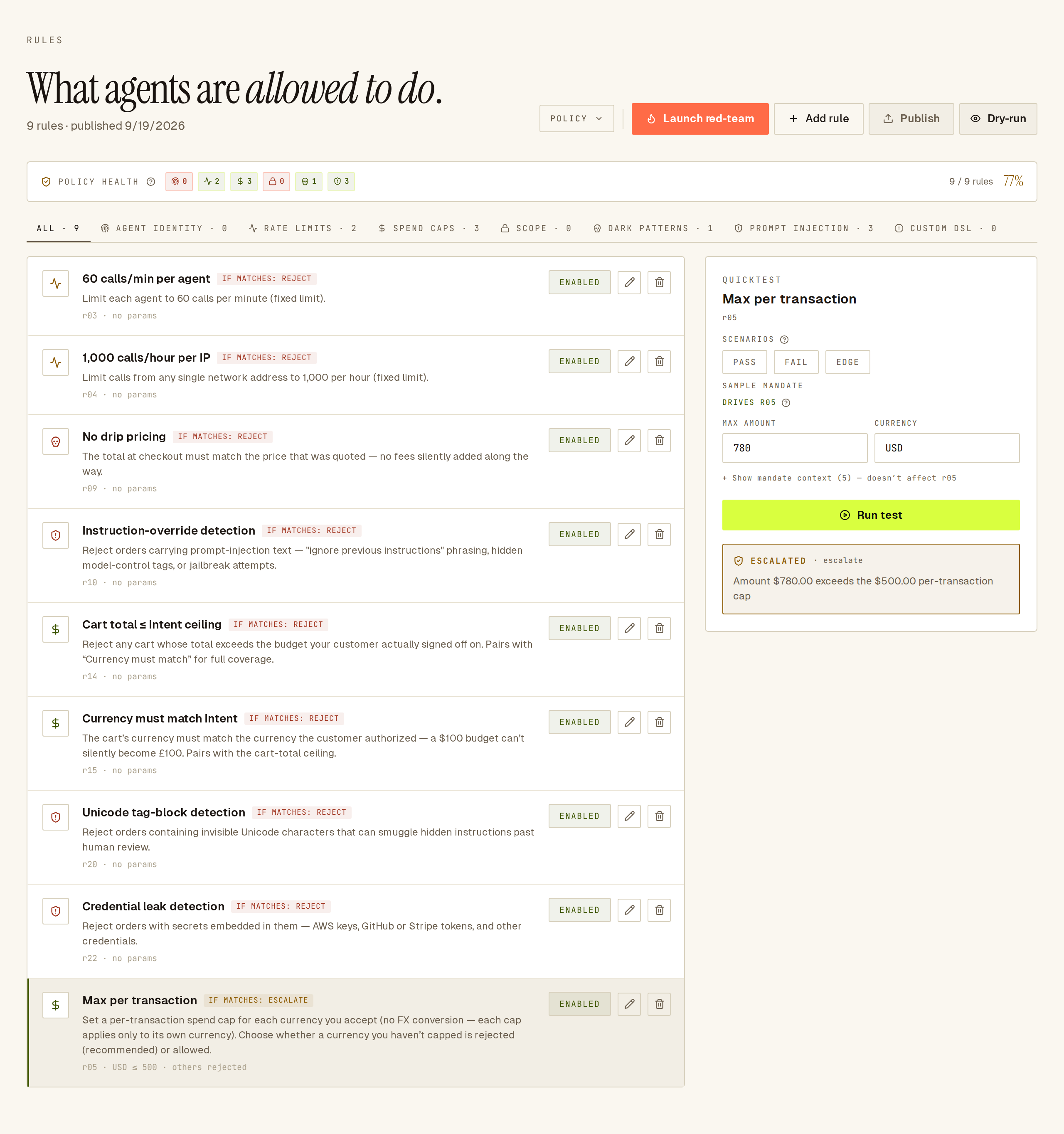 Select a rule, then use QuickTest on the right to try a sample order against it.
Add a rule
Section titled “Add a rule”- Click Add rule.
- Pick a category, then a rule. Rules marked COMING SOON can’t be added yet.
- Fill in the rule’s settings, for example an amount per currency for a spend cap, a list of agents for an allowlist, or countries for a geofence.
- Choose what happens when it fires: reject, escalate or allow. Allow approves the order immediately and skips the remaining rules, so use it for exemptions.
New and changed rules go into a draft. Nothing changes for live orders until you publish.
Allowlisted agents only
Section titled “Allowlisted agents only”The Allowlisted agents only rule rejects orders from every agent not on the list. Because it’s a reject-everything-else rule, Sill checks the list before you save:
- Each entry must be a known agent id. The field suggests the public agents Sill ships with (ChatGPT, Claude, Perplexity, and so on) and any agents that have already placed or tried orders on your site in the last 30 days.
- An unknown id (one you typed yourself that neither Sill nor your site has seen) shows a warning before you save and is refused on publish. This stops the common mistake of publishing a made-up id and then rejecting every real agent.
- Below the field, a line names the agents your site has seen in the last 30 days, so you can see the effect of the rule before you publish.
Start from a template
Section titled “Start from a template”When a site has no rules of its own yet, owners and admins see Load a starter template:
| Template | Rules | What it adds |
|---|---|---|
| E-commerce baseline | 8 | Rate limits, cart and currency checks and prompt-injection guards. The same set Sill adds when you first connect a payment rail. |
| Conservative / manual review | 12 | The baseline plus a per-order spend cap, human review on refunds and cancellations above a small amount, a shorter mandate validity window and a smaller size limit. |
| Low friction / high volume | 10 | The baseline plus a combined cap of about 5,000 calls an hour across all agents, and per-customer data scoping. No spend cap and no human review. |
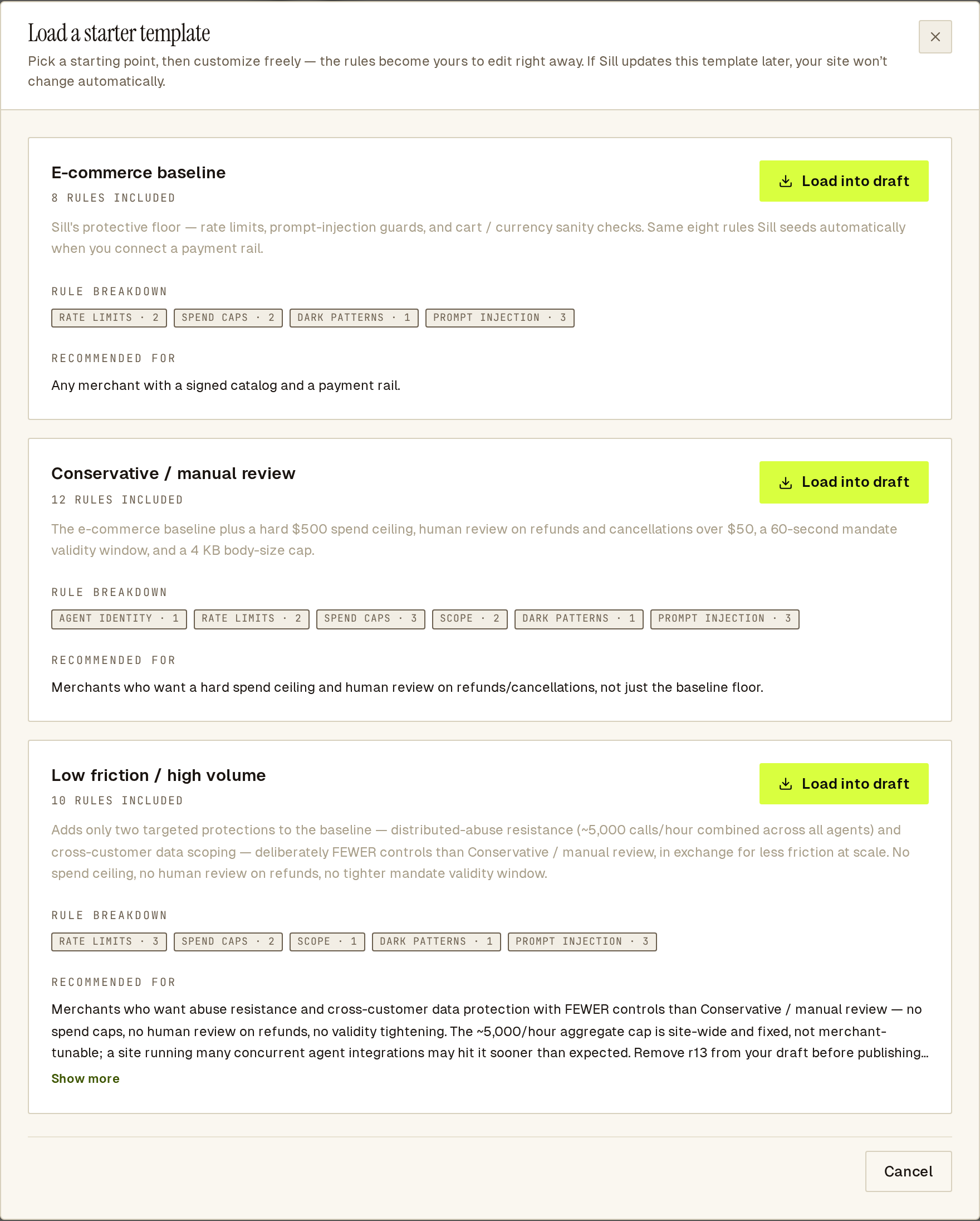 Each template shows how many rules it adds.
A template loads into your draft once. After that the rules are yours to edit; later changes to the template never change your policy.
Publish your changes
Section titled “Publish your changes”While you have unpublished changes, an Unpublished draft note appears above the rules, and changed rules are marked NEW · PENDING PUBLISH or EDITED · PENDING PUBLISH. Drafts save automatically.
Click Publish. Sill saves a new policy version and checks the next order against it. If a rule has an invalid setting, the publish is refused, the error is shown, and the current policy keeps running.
Use the POLICY menu to export the active policy or the draft as JSON, or import rules from JSON into the draft.
Test changes with dry-run
Section titled “Test changes with dry-run”Dry-run shows what your draft would do to real orders before you publish it.
- Click Dry-run and confirm Enable dry-run.
- Edit your rules. Your published policy keeps enforcing as before.
- Open DRY-RUN RESULTS below the rules. It lists, for the last 7 days, each order your draft would have rejected or escalated, with a sentence on why. Group by rule to see which rule would fire most.
- Publish the draft when you are happy, or change it back.
Rate-limit rules show INDETERMINATE in dry-run, because call counts are not tracked for the draft. Dry-run results are a preview for you; they are not signed or exported.
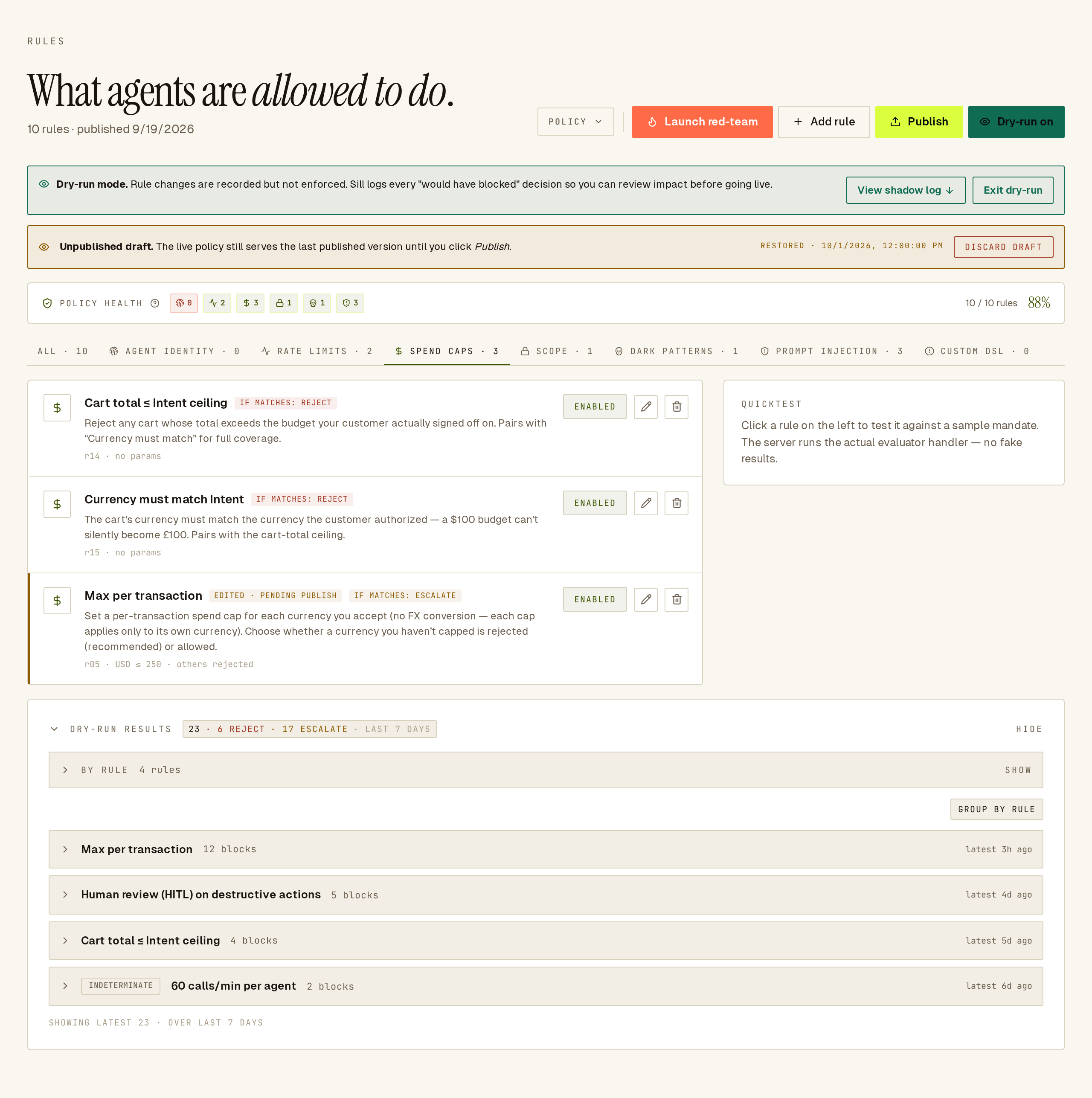 Dry-run shows which draft rule would have fired, before you publish it.
Try a sample order with QuickTest
Section titled “Try a sample order with QuickTest”Select a rule and use QuickTest on the right. Enter the values the rule looks at (or pick a preset), click Run test, and see whether the rule fires and what the outcome would be. Nothing is enforced or recorded.
Run the red team
Section titled “Run the red team”Launch red-team sends a set of attack-style test orders at your published policy and shows which ones it blocks, escalates or lets through. For each gap it offers to add the rule that would catch it. Nothing is charged and nothing is written to your audit log. Owners and admins only.
Rules Sill always enforces
Section titled “Rules Sill always enforces”Some rules in the list are labelled ENFORCED AT VERIFIER, ENFORCED AT EDGE or ENFORCED AT WEBHOOK. They run outside your editable rules (for example replay protection and failed-signature lockout), are always on, and can’t be tested in QuickTest. Rules labelled ENFORCED AT ORIGIN are ones you configure here that Sill checks at the charge (see below). The label’s tooltip says where each one runs.
Organization-wide spend caps
Section titled “Organization-wide spend caps”Two spend caps are checked at the moment of charging rather than with the other rules, because they need a running total across all your payment rails:
- Daily cap per user — how much one customer’s agents can spend in a rolling 24 hours, in USD.
- Cross-agent budget per organization — the combined spend of every agent acting for one organization. This stops many agents for the same buyer from adding up to a large total.
Because they run at the charge, they don’t appear in QuickTest or dry-run. When one blocks a payment, the order shows BLOCKED in Activity with the reason, and no money moves.
Auto-approve small refunds
Section titled “Auto-approve small refunds”The AUTO-REFUND card below the rules (Approve refunds under a cap automatically) lets refunds skip human review when they are small and come from the agent that placed the order. Owners and admins only.
- Turn on Auto-approve refunds under cap.
- Under MAXIMUM AUTO-APPROVE AMOUNT, enter a dollar amount.
- Click SAVE.
Sill confirms “Refunds up to $X are now auto-approved.” Refunds above the cap, or from a different agent, still go to Held orders. Turning it off sends every refund back to a person straight away; the amount is kept for next time.
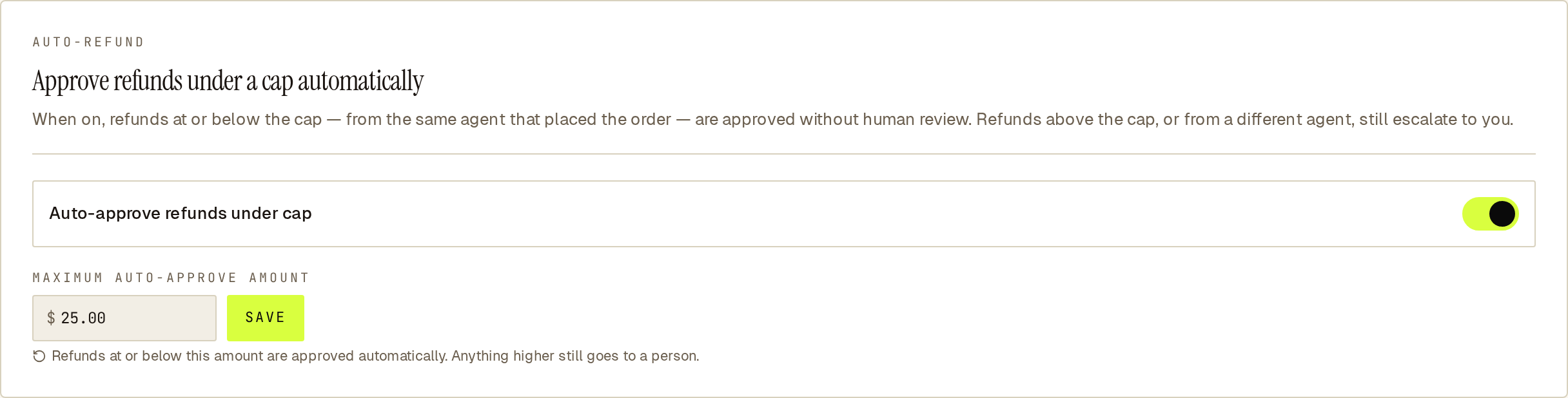 Refunds at or below the cap from the original agent are approved without review.
Common questions
Section titled “Common questions”Does dry-run weaken my live policy? No. Your published policy keeps enforcing. Dry-run only previews your draft.
Can a site run two policies? No. Each site has one active policy. Dry-run lets you preview a draft against the same orders.
Where do I see which rule decided an order? Open the order in Activity. The ACTIVITY tab lists the rules checked and the one that fired.
See also
Section titled “See also”- Policy engine — every rule and the policy language.
- Held orders — what happens when a rule escalates.
- Signed mandates — what the rules read.
- Audit log and bundle export — the signed record of every decision.