Policy engine
The policy engine decides what an agent may do on your site. Each site has one active policy: the ordered list of rules you manage under Rules. For every signed mandate, Sill checks the rules in order and returns one of three outcomes: approve, escalate (hold for a person on your team) or reject.
What a rule is made of
Section titled “What a rule is made of”| Part | Meaning |
|---|---|
| Rule type | What the rule checks, for example r05 Max per transaction or r07 Human review (HITL) on destructive actions. |
| Settings | The rule’s parameters, for example a cap per currency. |
| Order | Its position. Lower numbers run first. |
| Enabled | Disabled rules are skipped. |
| Action | What happens when the rule fails: Reject, Escalate or Allow (an exemption that approves the order immediately). |
A policy is a list of rules plus a version name. Publishing a new version replaces the active one for the site.
How rules are checked: first failure wins
Section titled “How rules are checked: first failure wins”flowchart TD
A[Signed order verified] --> B[Take enabled rules in order]
B --> C{Next rule?}
C -- none left --> APPROVE([Approved])
C -- yes --> D{Rule passes?}
D -- yes --> C
D -- "fails with Reject, or cannot be checked" --> REJECT([Rejected])
D -- fails with Escalate --> HOLD([Held for review])
D -- fails with Allow --> EXEMPT([Approved by exemption])
- Sill takes the enabled rules in order (ties go by rule id).
- It checks each rule against the order.
- The first rule that fails decides: its action is the outcome, and the remaining rules are not checked.
- If every rule passes, the order is approved.
There is no scoring and no voting. If a rule cannot be checked at all (it is missing a required setting, or it errors or runs out of time), the order is rejected rather than approved: the agent receives 503 ("outcome": "unavailable") and the audit record is rejected.
Some rules only apply to signed orders: on ordinary discovery traffic, rules such as the amount cap are skipped. Catalog rules (c01–c04) decide what appears in your agent catalog and are not checked against orders.
Outcomes and what the agent sees
Section titled “Outcomes and what the agent sees”| Outcome | When | Agent receives | Audit record |
|---|---|---|---|
| Approved | Every rule passed, or an Allow rule matched | 200, "outcome": "approved" | approved |
| Held | A rule with action Escalate failed | 202, "outcome": "escalated" and an escalation_id | escalated_approved or escalated_rejected once resolved |
| Rejected | A rule with action Reject failed | 403, "outcome": "rejected", "reason" set to the rule id | rejected |
| Rejected (rule could not be checked) | A rule is misconfigured, errored or ran out of time | 503, "outcome": "unavailable" | rejected |
Every record lists each rule that ran, whether it passed, the action taken and the reason, so you can see exactly why an order was approved, held or rejected. Open the record under Activity and switch to its ACTIVITY tab.
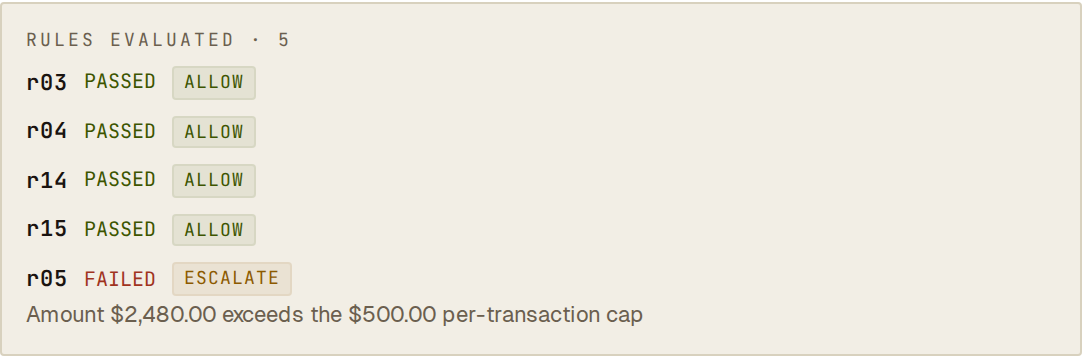 The spend cap failed, so evaluation stopped there and the order was held for review.
Example
Section titled “Example”Northwind Coffee Co. adds one rule to the baseline: Max per transaction at $500, action Escalate.
{ "rule_id": "r05", "type": "r05", "category": "spend", "order": 9, "enabled": true, "action_on_match": "escalate", "params": { "type": "r05", "caps": { "USD": 500 }, "on_unlisted_currency": "reject" }}The Acme Shopping Assistant signs an order for 12 burr grinders and 14 gooseneck kettles, $2,480.00 in total:
- The eight baseline rules (rate limits, injection checks, cart and currency checks) pass.
r05: $2,480.00 is over the $500 cap, so the rule fails. Its action is Escalate: the order is held and appears on Held orders.
An order for one $129.00 grinder passes every rule and is approved. An order in a currency the cap does not list also fails the rule, because on_unlisted_currency is reject, so it is held as well.
Rule categories
Section titled “Rule categories”The rules cover agent identity, rate limits, spend and amount checks, dark patterns (such as drip pricing), prompt-injection defences, geofencing, per-customer data scoping, integrity of signed manifests, and your own custom expression (r_custom). The Rules page lists every rule, its settings and the usual action. For how rules map to OWASP and MITRE ATLAS, see Compliance.
Two spend rules work on running totals and are applied just before the charge rather than at decision time: the per-customer daily spend cap (r06) and the organization-wide spend cap (r31). An order that breaks one of them is approved by the policy but not charged, and is shown as BLOCKED. See Payments.
Starting policies
Section titled “Starting policies”v1-default— installed automatically when you connect a payment rail, if the site has no policy yet. Eight rules that never block a normal order: per-agent and per-IP rate limits (r03,r04), no drip pricing (r09), prompt-injection and credential-leak checks (r10,r20,r22), cart total within the signed maximum (r14) and matching currency (r15). All reject; none escalate.- Starter templates under Rules: E-commerce baseline (the same eight rules), Conservative / manual review (adds a $500 hard spend cap, review of refunds and cancellations over $50, a 60-second order validity window and a 4 KB size limit), and Low friction / high volume (adds a site-wide rate cap and per-customer data scoping).
Frequently asked
Section titled “Frequently asked”Do all rules have to pass, or does the first failure decide? The first failing rule decides. Later rules are not checked.
Can a rule approve an order? Yes. A rule with action Allow approves the order when it fails, without checking the rest. Use it sparingly; most rules should reject or escalate.
What if a rule is misconfigured?
The order is rejected: the agent receives 503 and nothing is charged, and the record shows which rule could not be checked. Publishing checks rules first, so this is rare.
What if the site has no active policy?
Signed orders are refused with HTTP 503 ("outcome": "unavailable") until a policy is published, and nothing is charged. Connecting a payment rail installs v1-default for you.
See also
Section titled “See also”- Rules — edit rules, test them and publish.
- Signed mandates — what every evaluation starts from.
- Human in the loop — what happens when a rule escalates.
- Audit envelope — where the rule trace is stored.
- Compliance — framework mappings.