Skills
A skill is an action your store offers AI agents, such as browsing the catalog or checking an order’s status. Every site starts with seven default skills, and you can add custom skills. Agents find your skills on your signed agent card, in your MCP server’s tools/list, in your ARD catalog and on your /agent page. All four list the same skills, and only the ones that are live: a site with no live skills lists none.
Software, service and store sites can also turn on business skills, which hand agents a link to your pricing, sign-up, demo, booking, support, status or trust page.
A skill is shown to agents only when it is live: turned on, and backed by something that can actually answer it. Skills that would fail are not advertised.
The seven default skills
Section titled “The seven default skills”skill_id | Name | What it does | Needs a signed mandate |
|---|---|---|---|
browse_catalog | Browse catalog | Search and browse the product catalog | No |
check_availability | Check availability | Check real-time stock and availability | No |
place_order | Place order | Place an order with a signed payment authorization | Yes |
order_status | Order status | Look up the status of an order | No |
track_shipment | Track shipment | Track the shipment for an order | No |
request_refund | Request refund | Request a refund or return | Yes |
recommend | Recommend | Get product recommendations | No |
The skill_id is the name agents use everywhere: it is the tool name in MCP and the skill id on the agent card. Skills that need a signed mandate (auth_required: true on the card) can only run with a signed mandate that passes your guardrails.
What makes a skill live
Section titled “What makes a skill live”| Skill | Live when |
|---|---|
browse_catalog | Your catalog in Sill has at least one searchable product, or Shopify is connected, or you answer it from your own endpoint. |
check_availability | Your catalog in Sill has at least one searchable product, or you answer it from your own endpoint. |
order_status, track_shipment | Shopify or WooCommerce is connected, or you answer it from your own endpoint. |
recommend | Shopify is connected with storefront access granted, or you answer it from your own endpoint. |
place_order | A payment route is connected (Stripe, Shopify, or the WooCommerce payment-link checkout) and at least one product passes your checkout rules. |
request_refund | A refund-capable payment connection (Stripe or Shopify) is set up. |
| Custom skill | It has been added; for Live webhook or MCP server, its endpoint passed Sill’s checks. |
place_order and request_refund also stay off your agent card until you connect your store or payment provider (for example Shopify or Stripe), which proves you control payments for the domain.
Check and fix skills in the dashboard
Section titled “Check and fix skills in the dashboard”Settings → Skills shows one status per skill, with a one-line hint underneath when it is not live.
| Status | Meaning | What to do |
|---|---|---|
| LIVE | Turned on and backed. Agents can see and call it. | Nothing. |
| NOT LIVE | Turned on, but something is missing. The hint says what. | Follow the hint (see below). |
| COMING SOON | Not supported for your setup yet. | Nothing to do now; or Configure endpoint to answer it yourself, where offered. |
| VERIFY DOMAIN | place_order or request_refund on a site without a store or payment connection. | Connect your store or payment provider in Settings → Integrations. |
| DISABLED | You turned it off. | Turn the toggle back on. |
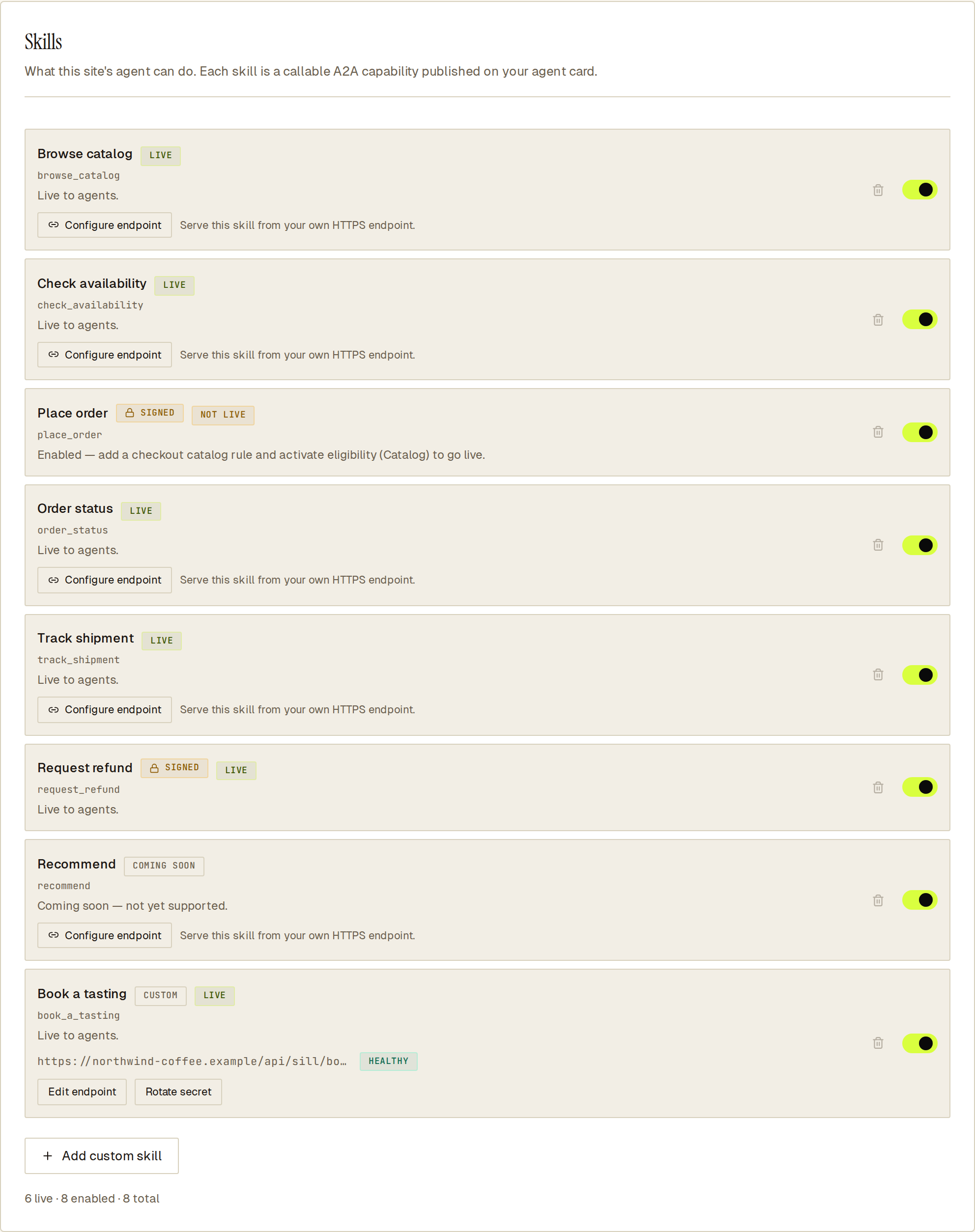 Each row tells you whether the skill is live and, if not, what to do next.
The hints for NOT LIVE rows:
| Hint | Fix |
|---|---|
| add catalog products to go live | Add or sync products in Products. |
| no product passes your checkout rules | Review Products eligibility so at least one product can be bought. |
| add a checkout catalog rule and activate eligibility | Add a checkout rule in Products and activate it. |
| add your ToS, privacy, and returns policies | Fill in Products → Compliance. |
| connect a payment rail (Stripe) to go live | Connect Stripe in Settings → Integrations. |
| connect a fulfillment backend to go live | Connect your store, or Configure endpoint. |
| fulfillment endpoint unreachable | Your endpoint failed 3 calls in a row. Fix it; Sill re-checks it on its own (after about 5 minutes, 15 minutes, 1 hour, then hourly) and restores the skill when a check passes. To re-check now, click Re-run activation battery (default skills) or save again with Edit endpoint (custom skills). |
Turning a skill on or off updates your agent card, MCP server and catalog within about a minute.
See which skills a site offers
Section titled “See which skills a site offers”Fetch the signed agent card; no Sill account is needed:
curl -s "https://edge.sill.so/v1/agent-card/${SITE_KEY}.json" | jq '.skills[].id'Or send tools/list to the MCP server. You can check the card’s signature against the public JWKS; see Verify a signature.