Benchmarks
Benchmarks shows one site’s rule setup and outcomes next to a cohort of merchants, chosen by industry and monthly agent traffic. Five cards cover how many rules you run, how many identity and spend rules you have enabled, how often agent calls are blocked or escalated, and how often blocks go to a person for review.
Benchmarks is not in the top navigation. Open it at app.sill.so/?view=benchmarks with your site selected.
The cohort numbers are prototype data. Your own values come from your live policy and your site’s activity. The cohort side (medians and percentile ranges) is synthetic: the same placeholder figures for every merchant, not real merchants’ numbers. A Prototype data. banner says so above the cards, and the footer reads PROTOTYPE DATA · YOUR VALUES READ FROM YOUR LIVE POLICY · COHORT PERCENTILES ARE SYNTHETIC PLACEHOLDERS. Use the cards to see your own setup at a glance, not to rank yourself against real peers.
Opt in
Section titled “Opt in”Benchmarks is opt-in, per site. Until the site is opted in, the page shows What you opt into. with four commitments, then Opt in to benchmarks and Read full methodology. Today, opting in records your preference only: no real cohort exists yet, so it does not change your account or what the page shows.
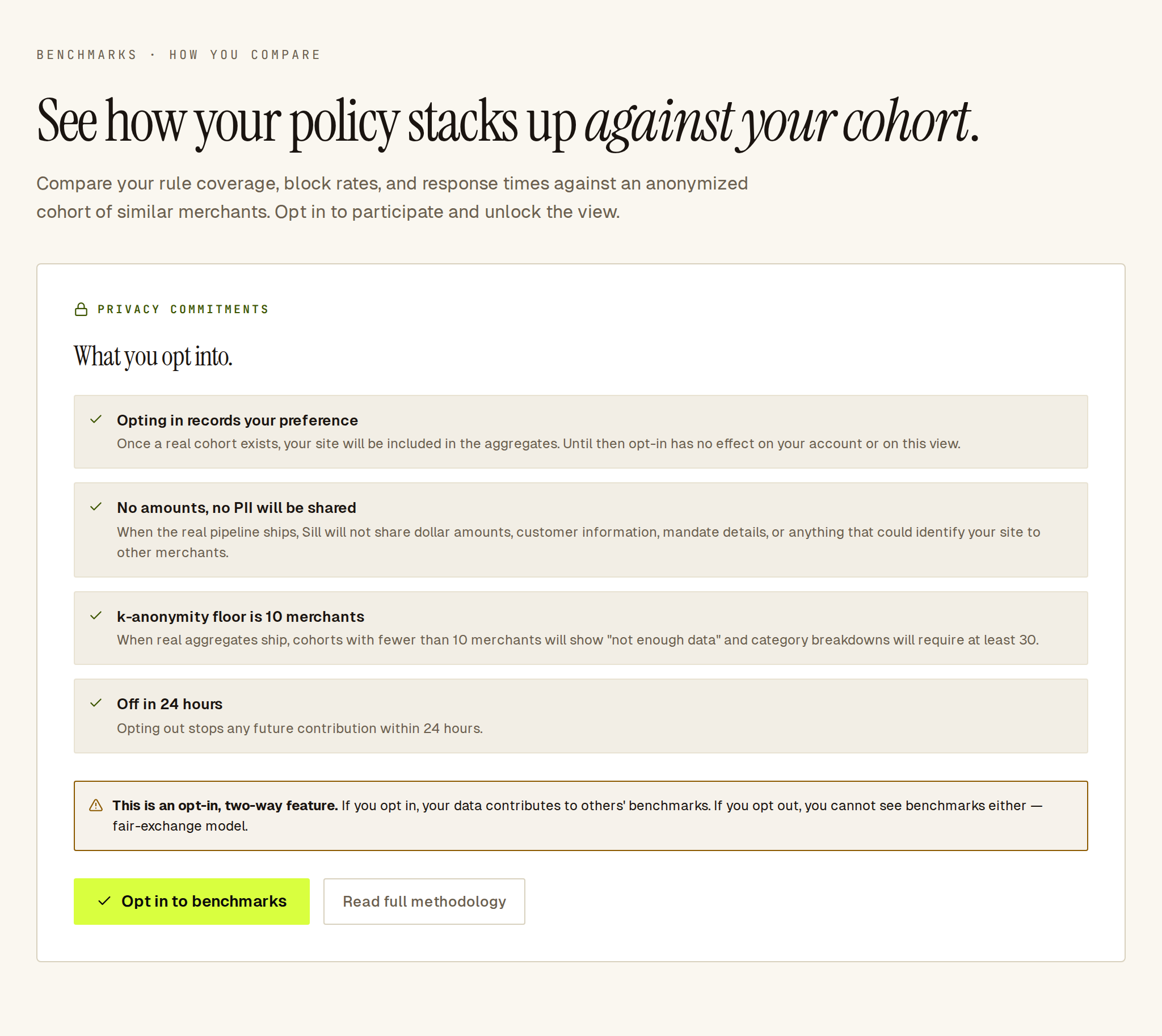 The opt-in screen: the four privacy commitments and the Opt in to benchmarks button.
- Open Benchmarks with the site selected.
- Read the commitments, and Read full methodology if you want the detail.
- Click Opt in to benchmarks.
Only an owner or admin can opt a site in or out. Reviewers and viewers see the same page, but the request is refused with a Couldn’t opt in. message.
The exchange is two-way: once a real cohort exists, opted-in sites count toward it, and opting out (Opt out, top right) also removes your own view of Benchmarks.
Choose a cohort
Section titled “Choose a cohort”At the top of the opted-in page:
| Control | Values |
|---|---|
| Industry | Food & beverage, Apparel & accessories, Home & garden, Electronics, Health & beauty, Digital services, All industries |
| Volume band | <1k calls/mo, 1k-10k calls/mo, 10k-100k calls/mo, 100k+ calls/mo |
| Cohort size | How many merchants are in the selected cohort. |
The page opens on Food & beverage and 1k-10k calls/mo. Changing either control reloads the cards.
A cohort smaller than 10 merchants shows COHORT TOO SMALL instead of cards. The Rules by category breakdown under the cards needs at least 30 merchants; below that, a note says how many the cohort has.
Read the five cards
Section titled “Read the five cards”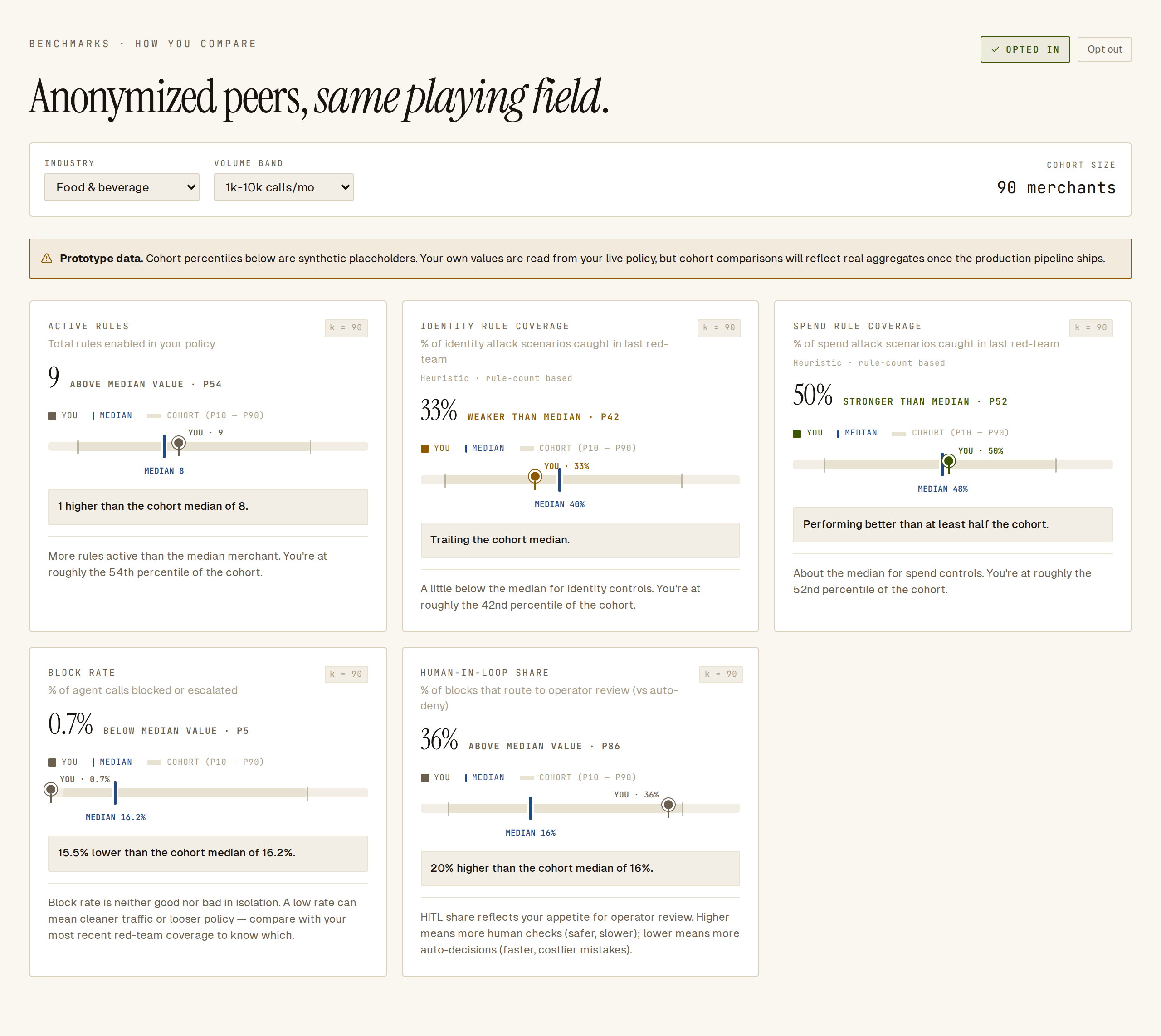 Each card places your value against the cohort’s median and P10–P90 range.
Each card shows your value, a verdict (for example ABOVE MEDIAN VALUE or WEAKER THAN MEDIAN), a bar with the cohort’s median and P10–P90 range, and a one-line reading.
| Card | Subtitle on the card | Your value |
|---|---|---|
| Active rules | Total rules enabled in your policy | Rules enabled in the site’s active policy. |
| Identity rules | Enabled identity rules out of 6 reference categories | Enabled identity rules as a share of six, capped at 100%. |
| Spend rules | Enabled spend rules out of 6 reference categories | Enabled spend rules as a share of six, capped at 100%. |
| Block rate | % of agent calls blocked or escalated | Share of agent calls in the last 30 days that were blocked or escalated. |
| Human-in-loop share | % of blocks that route to operator review (vs auto-deny) | Of the calls blocked or escalated in the last 30 days, the share a person reviewed. |
Sill does not show a decision-time card: there is no measured decision time to report yet.
The Identity rules and Spend rules cards are labelled Heuristic · rule-count based: they count rules, they do not test how well the rules stop attacks. To test your rules, run a dry-run in Rules.
A card with no data for your site, such as Block rate on a site without agent calls, shows Not enough data yet rather than a number.
Rules by category
Section titled “Rules by category”When the cohort has at least 30 merchants, Rules by category compares your enabled rules with the cohort median for each category: identity, rate limits, spend, scope, dark patterns and prompt injection. A category where you have no rules shows a small mark at zero.
What you opt into
Section titled “What you opt into”The opt-in screen lists these commitments:
- Opting in records your preference. Once a real cohort exists, your site will be included in the aggregates. Until then opt-in has no effect on your account or on this view.
- No amounts, no PII will be shared. When the real pipeline ships, Sill will not share dollar amounts, customer information, mandate details, or anything that could identify your site to other merchants.
- k-anonymity floor is 10 merchants. When real aggregates ship, cohorts with fewer than 10 merchants will show “not enough data” and category breakdowns will require at least 30.
- Off in 24 hours. Opting out stops any future contribution within 24 hours.
Read full methodology explains what will and will not be compared.
See also
Section titled “See also”- Rules — the rules counted on the first three cards.
- Overview — the site’s agent activity.
- Users and roles — who can opt a site in or out.