Live Agent view
The Live Agent view shows what happens when an AI agent visits your store. Pick an agent, press Run, and watch each step: how it finds your site, what it can read, whether it can buy, and where your rules step in.
Live Agent is not in the top navigation. Open it at app.sill.so/?view=simulation with your site selected.
Run a journey
Section titled “Run a journey”- Choose an agent from the Agent picker, for example Claude, ChatGPT or Gemini.
- Press Run. Each step appears in order on the left, and the call behind it appears on the right.
- Press Run again to repeat it, for example after you change a skill.
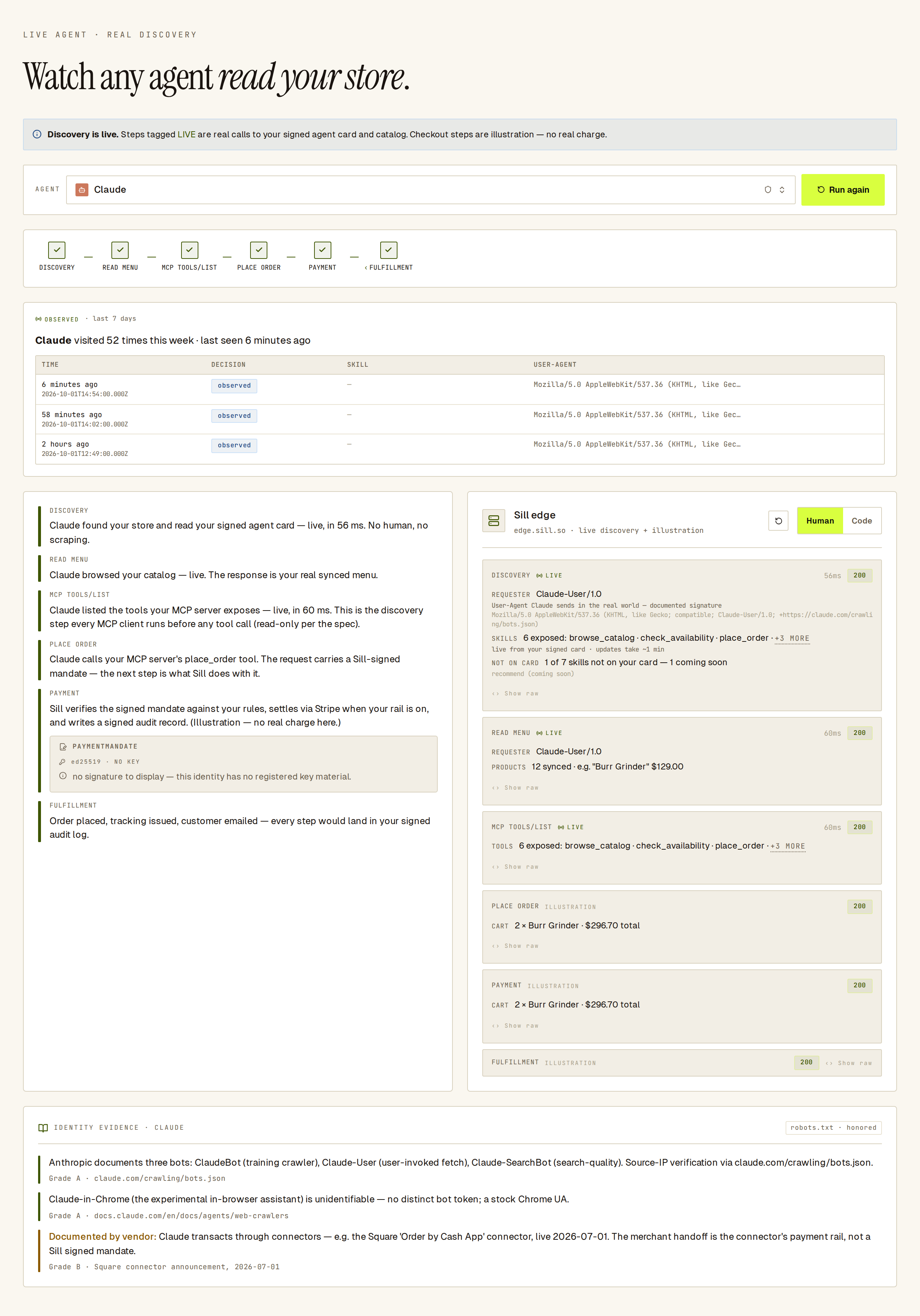 A completed Claude journey: live discovery calls at the top, illustrated checkout steps below.
What LIVE, ILLUSTRATION and OBSERVED mean
Section titled “What LIVE, ILLUSTRATION and OBSERVED mean”Every step carries a tag that tells you how much of it is real.
| Tag | What it means |
|---|---|
LIVE | A real request from your browser to your site’s public agent endpoints, with the real response and timing. |
ILLUSTRATION | A walkthrough of what the protocol does. No request is made and nothing is charged. |
OBSERVED | Real visits from that agent to your site in the last 7 days, read from your records. |
For an installed site, the discovery steps are live: the view reads your signed agent card and your published catalog, and on the Claude journey it calls tools/list on your MCP server. Checkout steps are always illustrations, so you can run any journey without moving money.
Until Sill is installed on the site, the view runs on sample data and says so in a Sample data. banner.
Journeys by agent
Section titled “Journeys by agent”Each journey follows the path that agent’s maker documents:
- Claude — a live
tools/listcall, so the tools shown are exactly what your MCP server offers right now, followed by an illustrated order: Claude calls your MCP server’splace_ordertool with a Sill-signed mandate, and Sill checks the mandate against your rules, settles through Stripe when your rail is on, and writes a signed audit record. No real charge is made. - ChatGPT — an illustration of the Agentic Commerce Protocol (Stripe with OpenAI): an order-approval request, then payment with a Stripe-issued token. Sill does not offer ACP checkout to merchants today; the steps show how the protocol works.
- Gemini — an illustration of an AP2 mandate carrying the buyer’s intent through cart and payment.
- Perplexity, Copilot and the other named agents — discovery, then a note on how that agent buys today, where its maker has documented one.
- Custom Agent — an agent you build yourself: discovery, then an illustrated order against your store.
- Unverified — an agent with no declared identity, stopped at the identity check.
Under each journey, Identity evidence lists what the agent’s maker publishes about it: user-agent strings, bot lists and signing keys, each graded by how strong the source is.
The picker groups agents by how well their identity can be established: IDENTIFIED · KNOWN, NOT PROVEN for named agents, SELF-BUILT · NO REGISTRY ENTRY for Custom Agent, and UNVERIFIED · BLOCKED PATH for Unverified. A VERIFIED group appears only when an agent’s identity can be checked cryptographically.
Human and Code views
Section titled “Human and Code views”The right-hand column has two views. Your choice is remembered.
- Human (default) — the outcome of each call in plain words: who asked, how many skills or products it saw, what the cart came to, with the tag, timing and status.
- Code — the raw request and response: method, full URL, the
User-Agentthe agent sends in real use, and the response body.
In the Human view, ‹› Show raw opens the raw call for one step. A failed call opens its raw error automatically.
See your skill settings take effect
Section titled “See your skill settings take effect”The view reflects your skill settings:
- The Discovery step reads your agent card the way agents do and says how many skills it offers. Any skill that is not on the card is listed with the reason: turned off, coming soon, or the step still needed to offer it (for example adding a returns policy).
- On the Claude journey, the
tools/listanswer comes from your MCP server. Turn every skill off and it reports zero tools, and the order step shows the refusal an agent would get. - On the other journeys, if
place_orderis not on your card, an amber note says agents cannot see checkout and that the rest of the journey only illustrates the protocol.
Skill changes reach your agent card within about a minute. Press Run again after that to see them.
Observed visits
Section titled “Observed visits”When the selected agent has visited your site in the last 7 days, the OBSERVED panel shows how many times and when it was last seen, then the most recent visits with Time, Decision, Skill and User-Agent. These come from your own records, not a simulation.
 The OBSERVED panel lists real visits from the selected agent, with the decision, skill and user-agent.
Is it safe to run?
Section titled “Is it safe to run?”Yes. Live steps are public, read-only requests to your own agent endpoints, the same ones any agent can reach. Nothing in this view places a real order or moves money.
See also
Section titled “See also”- Agents — every agent that actually visited, in detail.
- Skills — choose what agents can do.
- MCP server — the tools Claude and other MCP clients see.
- Agent card — the signed card agents read first.