Public agent readiness scan
The public readiness scan on sill.so checks whether AI agents can find and read a website today: the files, endpoints and robots.txt rules that AI crawlers look for. Enter any domain; no account is needed. The result is a short verdict plus one row per signal that you can expand for what it means and how to fix it. You can scan a limited number of domains in a short time; if you hit the limit, the page says how many minutes to wait.
For your own sites, the Agent readiness page in the dashboard runs the same checks and more, with step-by-step fixes and a Check again button.
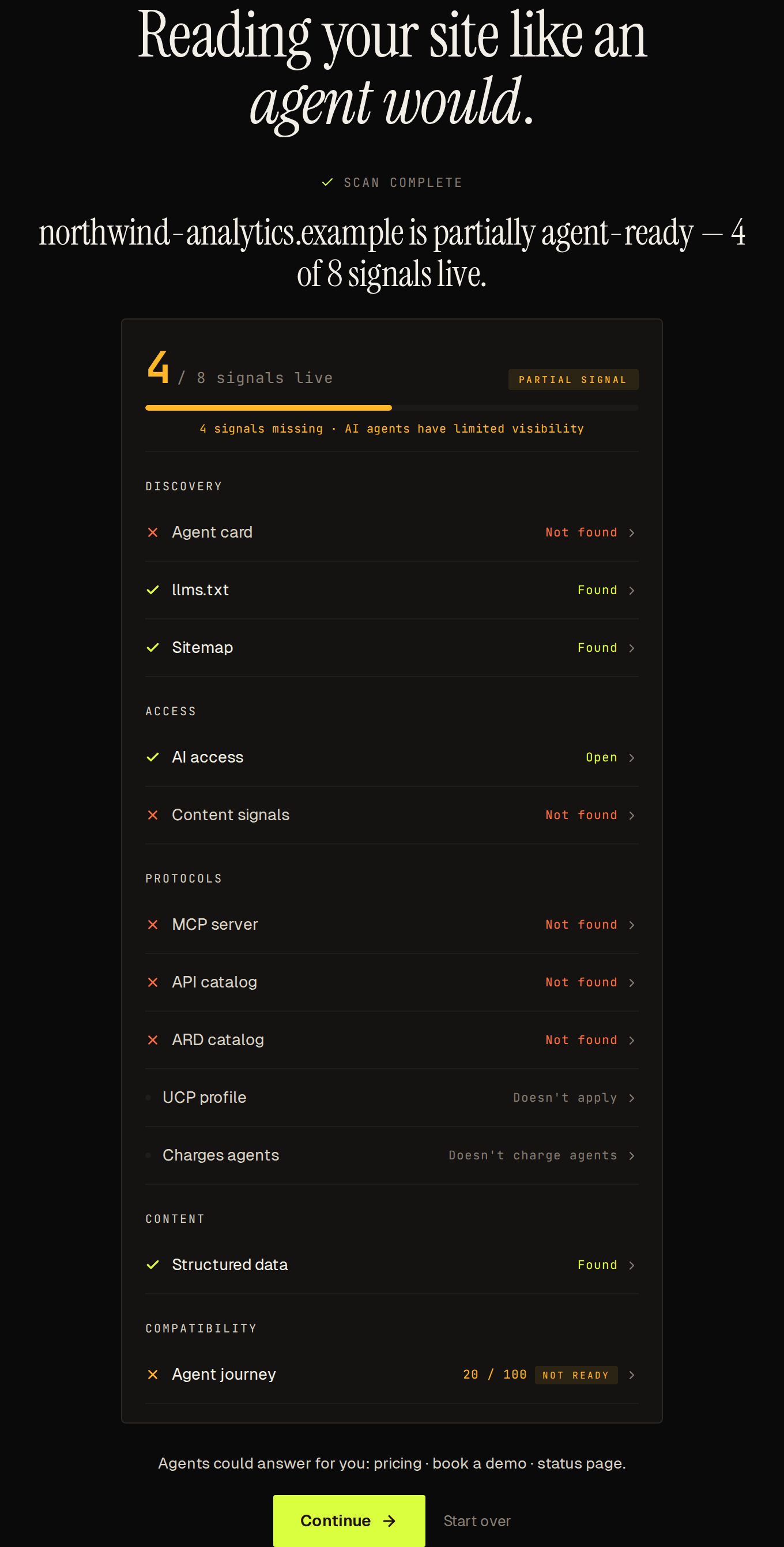 Four of eight signals live on a site that is not a store, with one expandable row per signal and the business pages Sill found.
Signals the scan checks
Section titled “Signals the scan checks”| Group | Signal | What is checked |
|---|---|---|
| Discovery | Agent card | Whether /.well-known/agent-card.json is served. |
| Discovery | llms.txt | Whether /llms-full.txt or /llms.txt describes the business for language models. |
| Discovery | Sitemap | Whether a sitemap answers at /sitemap.xml, at a Sitemap: URL in robots.txt, or at a common platform path (/sitemap_index.xml, /wp-sitemap.xml and others, including gzipped and plain-text sitemaps). The report shows the URL that answered. |
| Access | AI access | Whether robots.txt allows or blocks named AI crawlers — GPTBot, ClaudeBot, PerplexityBot, Google-Extended, CCBot, and others. |
| Access | Content signals | Whether robots.txt includes Content-Signal: directives per contentsignals.org. |
| Protocols | MCP server | Whether an MCP server card is served at /.well-known/mcp/server-card.json or /.well-known/mcp.json. |
| Protocols | API catalog | Whether /.well-known/api-catalog per RFC 9727 is served. |
| Protocols | ARD catalog | Whether an ARD catalog is served at /.well-known/ai-catalog.json. |
| Protocols | UCP profile | Whether a UCP business profile is served at /.well-known/ucp. |
| Content | Structured data | Whether the homepage carries schema.org JSON-LD. |
Which signals count toward the score depends on the site. For most sites, 8 signals count: every row above except ARD catalog and UCP profile. For a Shopify or WooCommerce store, UCP profile counts too, so the total is 9. ARD catalog is shown but never counted.
These rows are not counted in the score:
- Sill install appears at the top when Sill is detected on the domain.
- Charges agents (under PROTOCOLS) says whether the homepage asks AI agents to pay: Per request (x402) when it answers with an x402 payment request, Pay-per-crawl when Cloudflare pay-per-crawl charges AI crawlers, or Doesn’t charge agents. It is informational only.
- Agent journey (under COMPATIBILITY) follows the path an agent takes — homepage, agent card, MCP server, MCP tools, signature — and scores it out of 100.
Scoring
Section titled “Scoring”The counted signals produce a score (for example 5 / 8 signals live) and a verdict pill:
| Signals present | Verdict pill |
|---|---|
| 6 or more | AGENT-READY |
| 3 to 5 | PARTIAL SIGNAL |
| 0 to 2 | NOT DISCOVERABLE |
The scan also prints a one-sentence verdict. In these lines, N is the number of counted signals live and T is the counted total (8, or 9 for a Shopify or WooCommerce store):
- All T live → “
{domain}is agent-ready — N of T signals live.” When Sill is installed on the site, this reads “You’re already agent-ready.” instead. That line appears only at a full score. - All but one live → “
{domain}is mostly agent-ready — N of T signals live.” - 3 or more live, but fewer than T − 1 → “
{domain}is partially agent-ready — N of T signals live.” - 1 or 2 live → “
{domain}has minimal AI signals — N of T signals live. Not yet agent-ready.” - None live → “Agents can read
{domain}— but can’t act on it yet.” - The site refused the scan (for example, a firewall answered
403) → “{domain}blocked our anonymous read — a good sign.” See Let AI crawlers through your firewall if you want agents to read it.
When Sill is installed and the score is not full, the verdict is followed by a note: Sill is installed — finish the remaining signal in the dashboard. when one signal is missing, or Sill is installed — open your dashboard to finish setup. otherwise.
The shared report page and the report email use the same thresholds, so “mostly agent-ready” always means all but one counted signal is live.
Business pages found
Section titled “Business pages found”On a site that is not a store, the scan also lists the pages on your homepage that agents could hand people, for example Agents could answer for you: pricing · book a demo · status page. It covers pricing, demo, sign-up, booking, contact, status and trust pages. The line is not scored, and it is left out when none are found. Sill can turn these pages into business skills once you add the site.
Reading the results
Section titled “Reading the results”- Not found means the site answered but the file or endpoint was not there. If Sill could not reach the site for a signal, the row shows a dash instead.
- AI access reads Open when
robots.txtallows the named AI crawlers (a missingrobots.txtcounts as open), Some bots blocked when it blocks some of them, and AI bots blocked when it blocks all of them. - Agent card and MCP server count as present when Sill is installed on the domain, because Sill publishes both. API catalog is checked on its own.
The report email
Section titled “The report email”When you scan a domain and continue to the email step, Sill sends you a report email as well as the sign-in link. They arrive as two separate emails.
The report runs the same probes as the public scan but adds:
- The specific URL checked for each signal.
- For AI access: the exact crawler tokens your
robots.txtblocks. - Why each signal matters to agents.
- One-line fix guidance for every missing signal.
- The Charges agents row and, on a site that is not a store, the business pages found.
- A WAF is blocking AI agent crawlers banner if a firewall returned
403, with the paths to allow — see Let AI crawlers through your firewall.
Scanning the same domain with the same email address again within a short time does not send a second report.
The shared report page
Section titled “The shared report page”Every report has a shareable link at sill.so/report?id=…. The page shows the same signals, including Charges agents and any business pages found, with the date of the scan and a Claim {domain} button for the site’s owner. Report pages are marked noindex, so search engines do not list them.
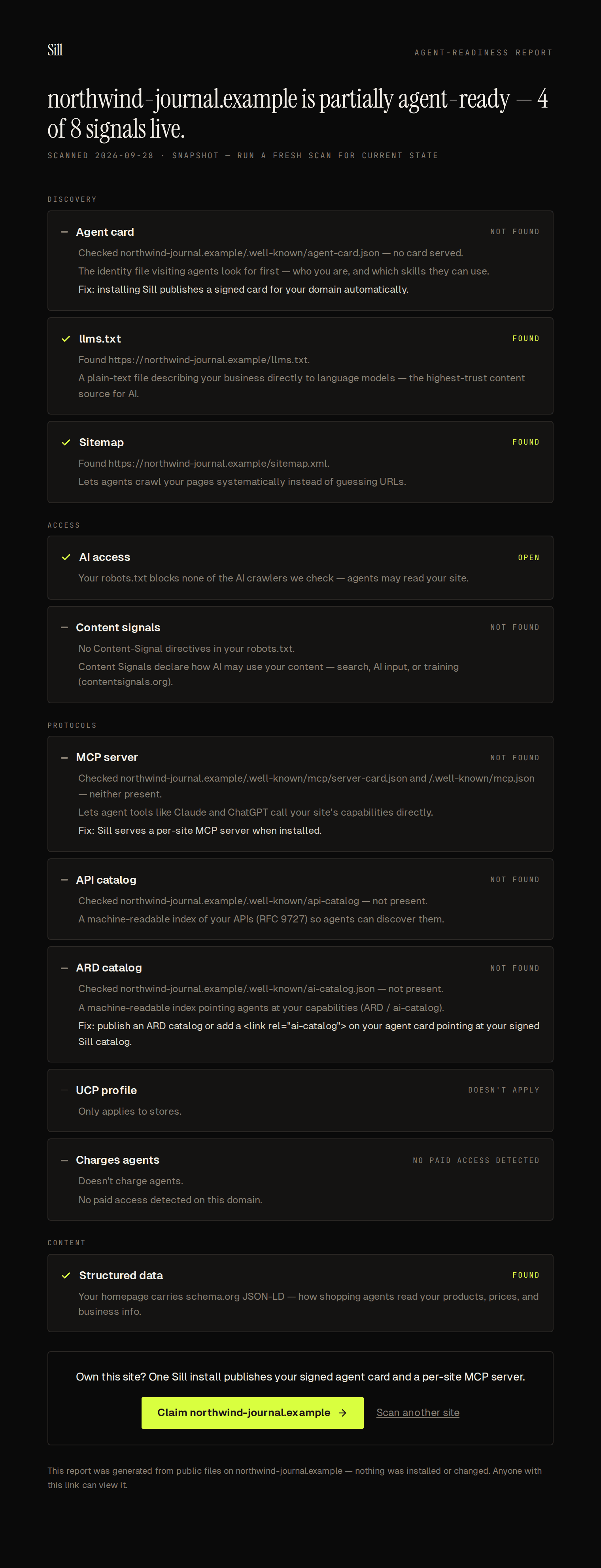 A shareable snapshot of a site’s readiness, dated and claimable.
Make your site agent-ready with Sill
Section titled “Make your site agent-ready with Sill”The scan reads what a crawler sees without running JavaScript. The embed script adds discovery <link> tags when the page runs in a browser, so a crawler that skips JavaScript does not see them, and /.well-known/agent-card.json on your domain stays empty unless something serves it there.
| Install | Agent card at /.well-known/ on your domain | Sees crawlers that skip JavaScript | Serves llms.txt and /agent on your domain |
|---|---|---|---|
| Cloudflare Worker | Yes | Yes | Yes |
| WordPress plugin | Yes | Yes | Yes |
| Shopify app | No — Shopify reserves the path; the card is at /apps/sill/agent-card.json | No — only when they call Sill directly | No |
| Script tag only | Add a 301 redirect | No | No — served on edge.sill.so |
Every install also verifies your domain. For the layer-by-layer view, see What each install covers.
See also
Section titled “See also”- Agent readiness — the dashboard version, with step-by-step fixes and a check-again button.
- Let AI crawlers through your firewall — fix a WAF that returns 403 to AI user agents.
- What each install covers — layers and the minimum install per stack.
- Embed script — the one-line script tag install.
- Agent card — what the signed card contains and how signing works.
- MCP server — the per-site MCP endpoint the scan’s MCP server row covers.
- Verify a signature — how a third party verifies any Sill-signed surface.