Returning visitors
Returning visitors lets Sill recognise the same person when they come back to your site, last month and again today. Each recognised visitor gets a card in the PEOPLE filter of the visits panel, with a timeline of their sessions. It is off until you turn it on, one site at a time.
It works through the embed script, so it needs the script tag on your pages (a Cloudflare Worker or the WordPress plugin adds it for you).
Turn it on
Section titled “Turn it on”Owners and admins can change this setting.
- Select the site in the site switcher.
- Open Settings → General.
- In Returning visitors (Recognise people who come back), switch the toggle on.
 The switch applies to one site. Visitor history is kept for 13 months.
New visits are recognised from the next page view. Visits from before you turned it on are not linked to anyone; they stay grouped as Earlier visitors.
Turning it off stops recognition straight away: the script stops storing IDs and removes the ones it stored before.
See a visitor’s timeline
Section titled “See a visitor’s timeline”- Open Activity and choose the PEOPLE filter.
- Each recognised visitor has a card, for example Visitor from Portland · Chrome on Mac · 11 visits · first seen Aug 28.
- Click a card to open the timeline.
The timeline shows the visitor’s VISITS, SESSIONS, FIRST SEEN and LAST SEEN, their LOCATION and DEVICE, and their sessions grouped by day. Each session lists its time, length, pages in order, location and, where you can see it, the IP address. A new session starts after 30 minutes without a page view.
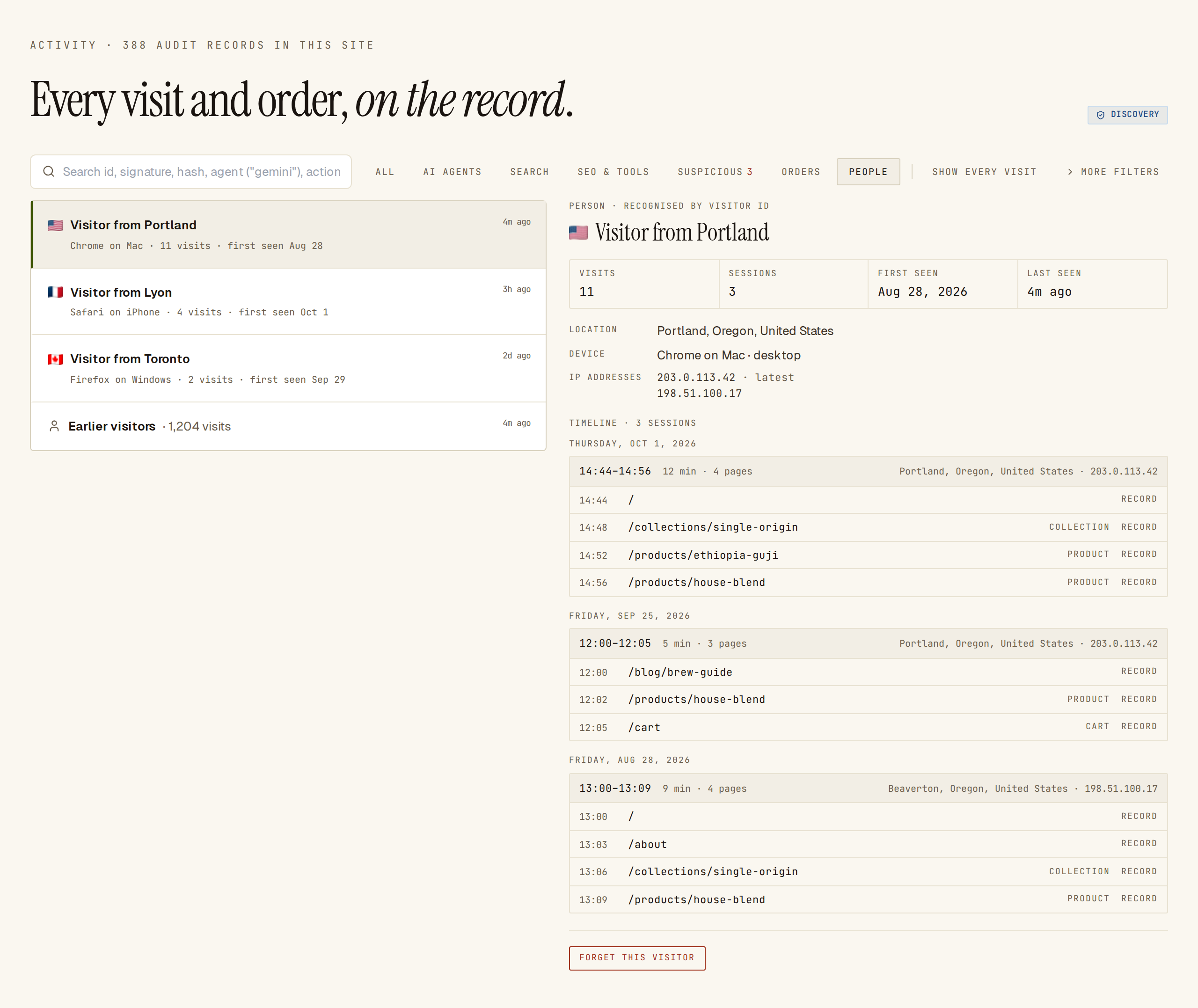 One card per visitor. The timeline shows each session by day, with the pages they read.
A visitor’s card is labelled RECOGNISED BY VISITOR ID when their browser keeps the visitor ID. When a browser keeps no storage, Sill recognises the visitor by their network and browser instead (RECOGNISED BY NETWORK + BROWSER); such a card may combine people who share a network, such as an office.
What is collected
Section titled “What is collected”When returning visitors is on, for each human visit:
- A random visitor ID and session ID, kept in the visitor’s browser on your own domain (see Cookie notice). They contain nothing about the person and are never shared with other sites.
- The pages they viewed, with times.
- Coarse location (city, region, country) and device (browser, system, desktop or mobile), the same as for every visit.
- The IP address the visit came from. Sill stores it encrypted.
IP addresses are recorded for people only, never for AI agents. They are shown only in a visitor’s timeline, and only to owners, admins and reviewers; viewers see Visible to owners, admins and reviewers. Each time addresses are shown, it is recorded in your account’s activity log.
Sill does not read form fields, page content or other cookies. The full list of what the script sends is in Embed script → What it sends.
Privacy signals and consent
Section titled “Privacy signals and consent”- Global Privacy Control. Browsers that send Global Privacy Control are never given an ID.
- Wait for consent. Add
data-sill-consent="required"to the script tag; IDs are kept only once your consent banner setswindow.sillConsent = true, from the next page view on. - Turn IDs off on a page. Set
window.sillConsent = false, or adddata-sill-consent="denied"to the script tag.
<script async src="https://cdn.sill.so/embed.js" data-site-key="us_…" data-sill-consent="required"></script><script> // in your consent banner's "accept" handler window.sillConsent = true;</script>Visits without an ID are still recorded as ordinary visits; they are just not linked to a returning visitor.
Cookie notice
Section titled “Cookie notice”If your site shows a cookie or storage notice, list these as analytics storage:
| Name | Kept for | What it is |
|---|---|---|
sill_vid | 13 months | Random visitor ID, in local storage. |
sill_sid | 30 minutes without a page view | Random session ID, in local storage. |
_sill_vid, _sill_sid | Same as above | The same IDs as first-party cookies, used only when local storage is unavailable. |
The script stores none of these while returning visitors is off.
Forget a visitor
Section titled “Forget a visitor”Owners and admins can delete one visitor’s history at any time.
- Open the visitor’s timeline.
- Click FORGET THIS VISITOR, then Forget visitor.
Sill deletes the visitor’s page history and any stored IP address that no other visitor uses. The signed visit records stay; they never contained the visitor’s identity. If the same browser comes back, Sill starts a new history.
How long data is kept
Section titled “How long data is kept”Visitor history, including IP addresses, is deleted 13 months after the visitor’s last visit. Signed visit records follow your audit log retention; see Security → Data retention and deletion.
Common questions
Section titled “Common questions”Can I see who a visitor is? No. Sill shows a place, a device and a history of pages, never a name or email.
Why does a visitor show up twice? Different browsers or devices get different IDs, and clearing site data starts a new one.
Does this slow down my site? No. The script checks once whether returning visitors is on for your site (a small request browsers cache for five minutes) and reads or writes its two IDs locally.