UCP checkout
The Universal Commerce Protocol (ucp.dev, spec 2026-08-25, Google × Shopify) is how a shopping platform, such as Google’s AI shopping surfaces, buys from a merchant on a shopper’s behalf. The platform reads the merchant’s profile, opens a checkout with items, adds the buyer, hands over a payment token, and gets back completed or requires_escalation.
Shopify stores can get UCP from Shopify. For a WooCommerce, custom or headless store connected to Stripe, Sill is the UCP endpoint: the profile is served at your domain’s /.well-known/ucp, the checkout runs at Sill’s edge, and every decision lands in the same signed audit envelope as the rest of the transactional product.
UCP checkout is part of Transactional, which is in early access. For how UCP fits with the other protocols Sill supports, see Protocols.
What Sill does on each request
Section titled “What Sill does on each request”| Platform request | Sill |
|---|---|
Reads https://<your-domain>/.well-known/ucp | Serves your business profile: endpoint, capabilities, the Google Pay handler, and Sill’s public signing key. |
POST /checkouts with items | Verifies the platform’s RFC 9421 signature against the platform’s own published keys; prices the cart from your catalog — the platform’s prices are ignored; returns the session with totals. |
PUT /checkouts/{id} with the buyer and shipping address | Updates the cart; offers your shipping options for that address with their prices; once the platform picks one, adds shipping and tax to the totals. The session becomes ready_for_complete once a buyer email is present and — for physical items — a shipping option is chosen. |
POST /checkouts/{id}/complete with a Google Pay token, and — when the platform supports AP2 mandates — the shopper’s signed mandate | Checks the mandate first: it must be signed by the platform’s published key, name this exact checkout and total, and carry Sill’s own signature over the terms (see below); anything else is refused before any money decision. Then runs your policy engine. Reject → a signed rejected record, checkout canceled. Escalate → the order enters your review queue (dashboard and Slack), the platform sees requires_escalation; on approval it re-sends complete with a fresh token. Approve → a signed approved record, then the charge on your Stripe account via Google Pay → completed with an order.id. |
GET /orders/{id} | The full order: lines, totals, and adjustments for any refund or dispute Sill has seen on your Stripe account. |
| (nothing — Sill calls the platform) | On creation and whenever the order changes (refund, dispute), Sill POSTs the full order to the platform’s webhook URL, signed with the key your profile publishes. |
Sill never sees card numbers. The Google Pay token is minted on your Stripe account (your profile advertises your Stripe publishable key), used once, and never stored or logged.
Signed terms (AP2 mandates)
Section titled “Signed terms (AP2 mandates)”Every checkout Sill returns is signed on your behalf: the response carries ap2.merchant_authorization, a signature over the priced cart (lines, totals, status) made with the key your profile publishes. A platform that supports the AP2 mandates extension (dev.ucp.common.payment.ap2_mandate) sends, on complete, the shopper’s approval of that signed checkout. Sill completes the order only if the platform’s signature is valid, the approval names this checkout, total and currency, and the terms inside it still carry your signature, so the shopper is charged only for terms both sides saw. A platform that advertises the extension must send this approval; a platform that does not can complete without it.
Checklist: getting checkout advertised
Section titled “Checklist: getting checkout advertised”Your profile is published as soon as a Worker or plugin install serves /.well-known/ucp. Checkout is advertised — and only then — when all of these are true. In the dashboard, Settings → Install → Endpoint → UCP checkout shows the same checklist and names what is missing. Owners and Admins see this row; other roles do not.
The row shows NOT ADVERTISED YET or CHECKOUT ADVERTISED, GOOGLE PAY · TEST or GOOGLE PAY · PRODUCTION, DIGITAL ONLY or SHIPPING · N OPTIONS, and SIGNED CHECKOUTS once signed terms are offered. Each missing item is listed with a short fix.
- Stripe connected (see Connect payments), so Sill has your publishable key. If the row says Stripe needs to be reconnected once, connect Stripe again so Sill can read it.
- Settlement rail is Stripe for this site (Settings → Integrations). UCP checkout pays into Stripe; a site that settles on Shopify is not offered UCP checkout.
- Stripe rail enabled for the site. Connecting Stripe enables it; if it was turned off, click Turn rail on on the Stripe card in Settings → Integrations (Owners and Admins).
- A published policy — Sill will not approve a checkout against a site with no rules.
- Live mode only: a Google Pay merchant ID from the Google Pay & Wallet Console, saved under Settings → Install → Endpoint → UCP checkout → Google Pay details. Test-mode Stripe accounts need none.
Shipping is not on the checklist, but you need it to sell items that ship. Add at least one shipping option under Settings → Install → Endpoint → UCP checkout → Shipping & tax (name, price, optional countries, optional free-over threshold), plus tax rules by country and region if you charge tax. Without shipping options the row shows DIGITAL ONLY: platforms are not asked for a shipping address and no shipping is added to the total, which suits digital items only.
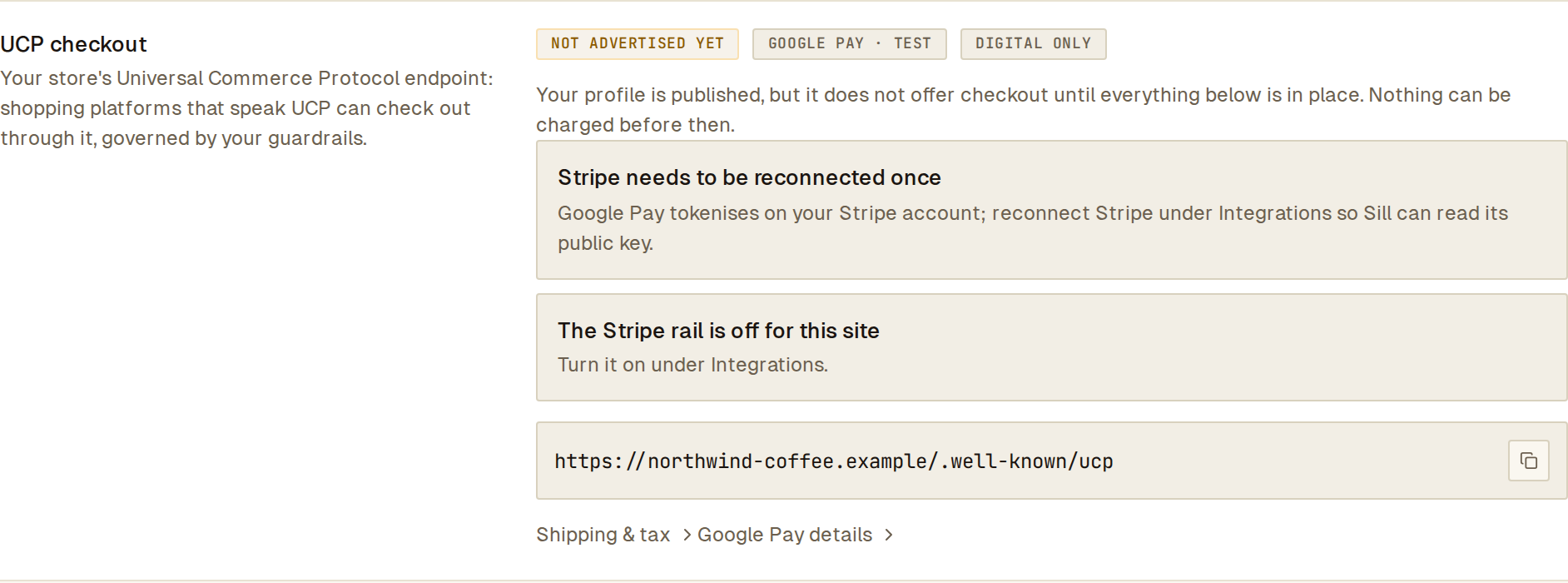 The UCP checkout row names what is still missing before shopping platforms can check out through your store.
What the audit log shows
Section titled “What the audit log shows”Each complete writes exactly one signed record under the platform’s identity (agent_ucp_<platform host>) with the cart, the amount, the rules that ran and the decision. A held checkout ends as escalated_approved or escalated_rejected, with the reviewer’s user id on the signed record, as for any other agent order. A held checkout that nobody resolves is rejected after 24 hours. Refunds and disputes appear on the same record’s settlement evidence and flow into the order the platform sees.
Check your setup
Section titled “Check your setup”- Open
https://<your-domain>/.well-known/ucp. You should see your profile withdev.ucp.shopping.checkout,dev.ucp.shopping.orderanddev.ucp.common.payment.ap2_mandateundercapabilities(plusdev.ucp.shopping.fulfillmentonce you add shipping options) andcom.google.payunderpayment_handlers. If those are empty, go through the checklist above — Settings → Install → Endpoint → UCP checkout names what is missing. - Once a platform lists your store, every checkout it runs appears on your Activity view and, when a rule asks for review, on Held orders and in Slack — the same places as any other agent order.
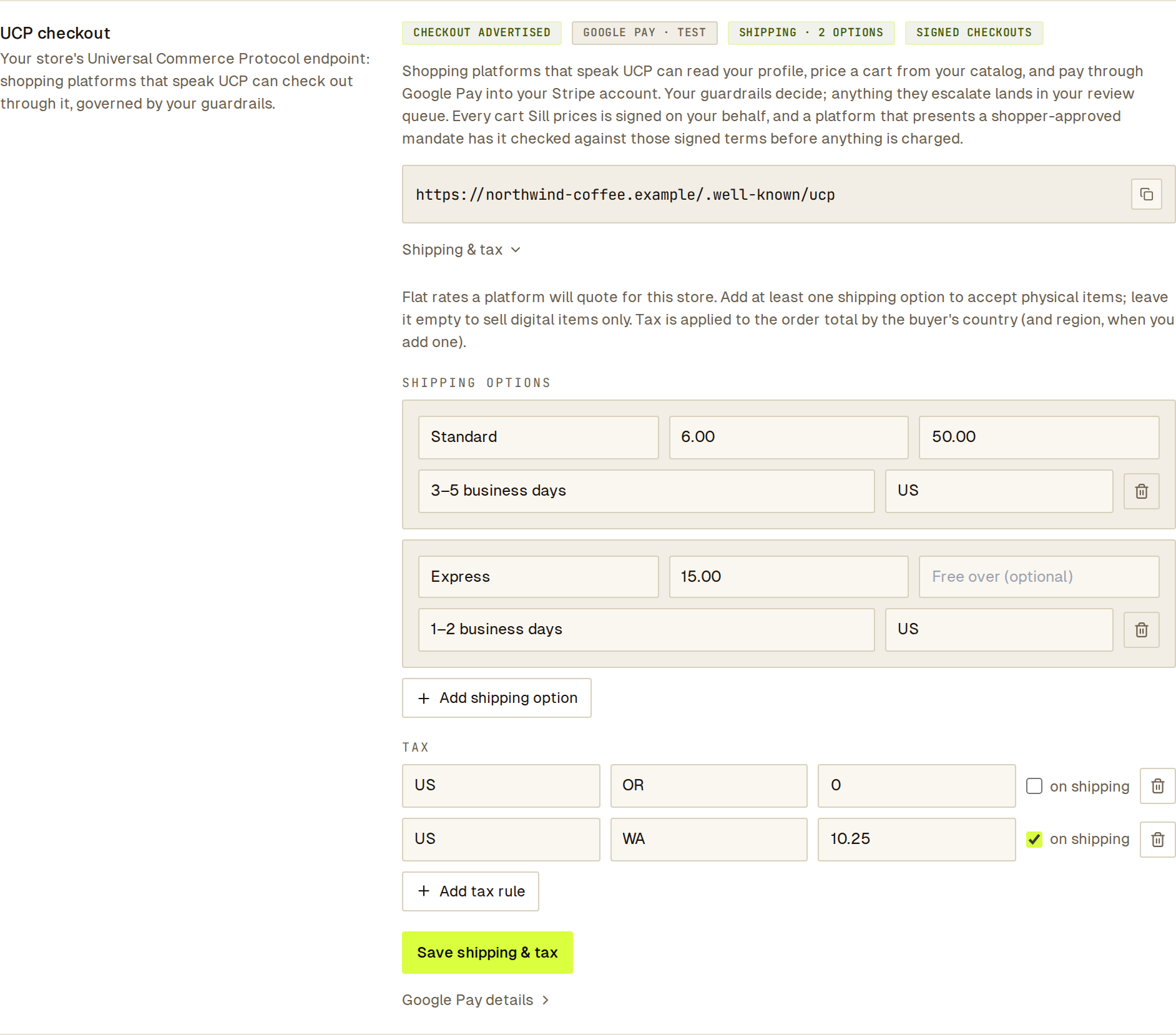 With checkout advertised, the flat shipping options and tax rules you set are what platforms quote.
Current limits
Section titled “Current limits”- Shipping and tax are the flat rates you configure; Sill does not pull live carrier rates or use a tax service. The order reports where it ships, not shipment events — Sill is not your fulfillment system.
- Google Pay runs in the TEST environment while your Stripe account is in test mode. With a live Stripe account it runs in production, and checkout is not advertised until a Google Pay merchant ID is set.
- UCP checkout is Stripe-only by design. Shopify-connected stores get UCP from Shopify directly.
- Being listed on Google’s shopping surfaces requires Google’s merchant approval, which you apply for with Google.